When it comes to producing fine art prints, the right printer can make all the difference. You want something that captures vibrant colors and intricate details, ensuring your work stands out. The landscape of photo printers is constantly evolving, and 2025 brings several exceptional options to evaluate. Each model offers unique features tailored to elevate your artistic vision. Let’s explore which printers can transform your creations into stunning gallery-quality prints.
Canon imagePROGRAF PRO-310 Wireless Inkjet Photo Printer

If you’re a professional photographer or artist looking to produce gallery-quality prints, the Canon imagePROGRAF PRO-310 Wireless Inkjet Photo Printer is an ideal choice. With its 9-color pigment-based ink system, including the LUCIA PRO II ink for enhanced gloss and scratch resistance, your prints will exhibit stunning detail and vibrancy. The matte black ink delivers deep blacks and an impressive dynamic range. Its user-friendly 3.0-inch color LCD monitor makes checking ink levels and printer status a breeze. Plus, features like the anti-clogging system and skew correction enhance productivity, ensuring you create exceptional prints with ease.
Best For: Professional photographers and artists seeking to produce high-quality, gallery-ready prints.
Pros:
- Produces stunning, vibrant prints with a 9-color pigment-based ink system.
- User-friendly interface with a 3.0-inch color LCD monitor for easy monitoring and settings adjustment.
- Features like anti-clogging and skew correction improve productivity and print quality.
Cons:
- May be considered expensive for casual users or hobbyists.
- Wireless connectivity may require setup and troubleshooting for some users.
- Limited to printing sizes up to 13 inches, which may not meet the needs of all users.
CANON PRO 2100 24 WIDE, FORMAT FINE ART PRINTER
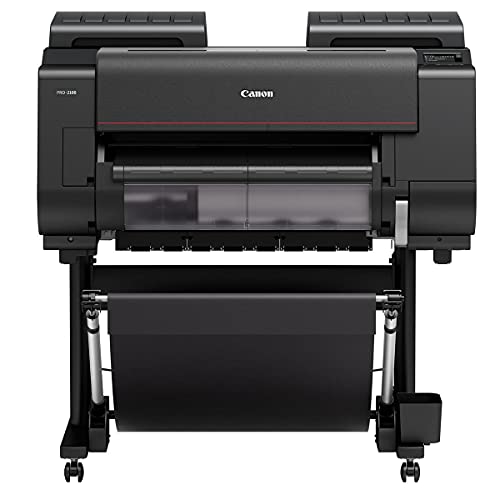
The Canon PRO 2100 is an ideal choice for professional photographers and artists seeking unparalleled image quality in a 24-inch wide format fine art printer. With its LUCIA PRO ink set and Chroma Optimizer, you’ll achieve stunning color consistency. The printer features a high-precision 12-channel print head, enabling a maximum resolution of 2400 x 1200 dpi. Intelligent media handling and borderless printing enhance your creative options. It comes with essential components like a printer stand, starter ink tanks, and a user manual. With a solid 4.7-star customer rating, this printer is a reliable tool for elevating your artwork.
Best For: Professional photographers and artists who demand exceptional image quality and color consistency in their prints.
Pros:
- Outstanding print resolution of 2400 x 1200 dpi for detailed images.
- Utilizes LUCIA PRO ink set with Chroma Optimizer for vibrant and consistent colors.
- Intelligent media handling and borderless printing capabilities enhance creative flexibility.
Cons:
- Weighs 289 pounds, making it less portable.
- Higher initial investment compared to standard printers.
- Limited to 24-inch wide format, which may not meet all printing needs.
Canon PIXMA PRO-200S Wireless Inkjet Photo Printer

For photographers and graphic artists seeking professional-quality prints, the Canon PIXMA PRO-200S Wireless Inkjet Photo Printer stands out with its vibrant 8-color dye-based ink system. This compact printer delivers stunning A3+ prints at a maximum resolution of 4800 x 2400 dpi. You’ll appreciate its high-speed capabilities, producing bordered A3+ prints in just 90 seconds. Equipped with a 3.0” color LCD monitor, checking ink levels and printer status is a breeze. With versatile connectivity options like Ethernet and USB, it fits seamlessly into your workspace. Plus, its 100-sheet capacity guarantees you’ll keep printing without interruptions.
Best For: Professional photographers and graphic artists seeking high-quality, vibrant prints.
Pros:
- High-resolution printing up to 4800 x 2400 dpi for stunning detail.
- Fast print speeds, producing bordered A3+ prints in just 90 seconds.
- Compact design with a user-friendly 3.0” color LCD monitor for easy operation.
Cons:
- Print function only; no scanning or copying capabilities.
- Heavier design at 32 pounds, which may limit portability.
- Limited warranty; customers must refer to the manufacturer for details.
Liene M100 Portable Instant Photo Printer for iPhone and Android

Looking for a portable photo printer that delivers stunning quality on the go? The Liene M100 is an excellent choice for both iPhone and Android users. This compact printer uses thermal dye sublimation technology to produce vibrant, long-lasting 4×6-inch prints in just 59 seconds. With a built-in Wi-Fi hotspot, you can connect up to five devices simultaneously without needing an external network. Customize your prints using the Liene App, adding borders and filters for a personal touch. Plus, its laminated surface resists water, scratches, and fading, ensuring your memories stay beautiful for years to come.
Best For: Those who want a portable and user-friendly photo printer that delivers high-quality prints quickly and conveniently.
Pros:
- High-quality prints with vibrant colors and a laminated surface that resists water and scratches.
- Fast printing speed of just 59 seconds per photo, making it ideal for events and on-the-go use.
- Customizable prints through the Liene App, allowing users to add personal touches and print various photo types.
Cons:
- Limited print size of 4×6 inches may not meet the needs of users looking for larger prints.
- Weight of 6.32 pounds makes it less portable compared to smaller photo printers.
- Dependence on app for customization and operation may be inconvenient for some users.
Canon PIXMA G620 Wireless All-in-One Printer
![Canon PIXMA G620 Wireless MegaTank Photo All-in-One Printer [Print, Copy, Scan], Black,Works with Alexa](https://m.media-amazon.com/images/I/31W+8GDKNLL._SL500_.jpg)
Photographers seeking vibrant, high-quality prints will find the Canon PIXMA G620 Wireless All-in-One Printer an excellent choice. With its MegaTank system, you can print up to 3,800 4” x 6” color photos on a single ink set, dramatically cutting your costs to about 2.5 cents per print. You’ll appreciate the 6-color dye-based ink system, which includes Red and Gray inks for a wider color gamut and long-lasting results thanks to CHROMALIFE 100 technology. Plus, with Alexa compatibility, you’ll receive notifications for low ink levels and can even reorder automatically without a subscription. Its compact design fits seamlessly into any space.
Best For: Photographers looking for an efficient and cost-effective solution for vibrant, high-quality photo printing.
Pros:
- High page yield with the MegaTank system, allowing up to 3,800 prints per ink set.
- Cost-effective printing at approximately 2.5 cents per 4” x 6” color photo.
- Alexa compatibility for low ink notifications and automatic reordering.
Cons:
- Limited to photo printing; lacks advanced features for professional document printing.
- Requires space for the compact design, which may not suit all environments.
- Initial setup may require some technical knowledge for optimal performance.
Epson EcoTank Photo ET-8550 Wireless All-in-One Supertank Printer

The Epson EcoTank Photo ET-8550 stands out as an exceptional choice for artists and creative professionals who demand high-quality prints without the hassle of traditional cartridges. This wireless wide-format supertank printer delivers vibrant colors and sharp images, achieving print speeds of up to 16 pages per minute. With its versatile functionalities, you can print, scan, and copy effortlessly. Plus, you can connect via wireless, Ethernet, or USB, allowing you to print from anywhere. The 4.3-inch color touchscreen simplifies navigation, while mobile and voice printing options enhance convenience. Elevate your artwork with the EcoTank ET-8550 for stunning gallery-quality prints.
Best For: Artists and creative professionals looking for high-quality, vibrant prints without the inconvenience of traditional ink cartridges.
Pros:
- Cartridge-free design: Utilizes ink bottles for long-lasting, vibrant colors and images.
- Versatile connectivity: Supports wireless, Ethernet, and USB connections for printing from various devices.
- Convenient features: Includes mobile and voice printing options, along with a user-friendly 4.3-inch color touchscreen.
Cons:
- Initial cost: The upfront investment may be higher compared to traditional printers.
- Size: As a wide-format printer, it may require more space than standard printers.
- Limited print media: May have restrictions on certain types of specialty papers or media.
Canon Selphy CP1500 Wireless Compact Photo Printer (Black)

For those who want high-quality prints on the go, the Canon Selphy CP1500 Wireless Compact Photo Printer is an ideal choice. Its sleek design and optional battery pack make it easily portable. You can print directly from smartphones, computers, or cameras using Wi-Fi, USB, or memory cards. With various print sizes and a 3.5” display for editing, you’ll enjoy customizing your images. Plus, the prints are instantly dry, water-resistant, and last up to 100 years. With a solid 4.4-star rating from customers, this compact printer proves reliable for anyone seeking gallery-quality photos wherever they are.
Best For: Those seeking a portable and efficient photo printer for high-quality prints on the go.
Pros:
- Easy connectivity options via Wi-Fi, USB, and memory cards.
- Compact and portable design with optional battery pack for printing anywhere.
- Instant-dry, water-resistant prints that last up to 100 years.
Cons:
- Limited max input sheet capacity of only 1 sheet at a time.
- Maximum print resolution of 300 x 300 dpi may not meet the needs of professional photographers.
- Some users may find the price point higher compared to traditional printers.
Epson Expression Photo XP-970 Wireless Color Photo Printer

If you’re seeking a compact and versatile printer that delivers professional-quality photos, the Epson Expression Photo XP-970 is an excellent choice. This wireless color printer boasts a 6-color Claria Photo HD ink system, ensuring vibrant colors and smooth gradations. It prints wide-format images up to 11 x 17 inches in as little as 11 seconds for 4 x 6 photos. With features like a fold-over scan lid, duplex printing, and easy connectivity via Wi-Fi Direct, you can quickly print from your devices. Plus, its sleek design fits perfectly in any workspace, making it a smart addition to your creative toolkit.
Best For: Photographers and creative professionals seeking a compact printer that delivers high-quality prints and versatile functionality.
Pros:
- Professional-quality prints with 6-color Claria Photo HD ink for vibrant colors and smooth gradations.
- Fast printing speed, producing 4 x 6 photos in as little as 11 seconds.
- Duplex automatic printing and innovative fold-over scan lid for efficient scanning and copying.
Cons:
- Requires genuine Epson cartridges, as non-genuine ink may cause damage not covered under warranty.
- Limited maximum media size of 11 x 17 inches may not meet the needs of all users.
- Heavier weight at 19.4 pounds may make it less portable compared to other options.
Epson Expression Premium XP-7100 Wireless Color Photo Printer
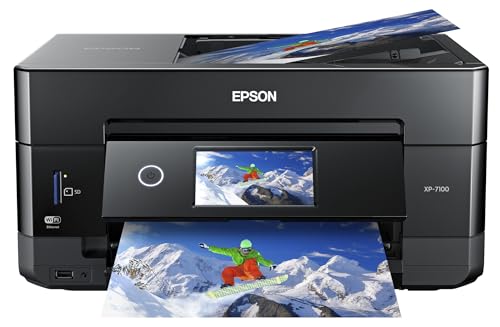
Designed with photographers in mind, the Epson Expression Premium XP-7100 Wireless Color Photo Printer delivers exceptional print quality, making it an ideal choice for those who want to showcase stunning images. With a compact black design, it features an auto document feeder, scanner, and copier, enhancing your productivity. You’ll enjoy sharp text and vibrant photos, especially when using Epson Genuine Cartridges. The large 4.3-inch touchscreen makes navigation easy, while direct printing from USB or SD cards adds convenience. Plus, it supports borderless printing up to 8×10 inches, allowing for creative projects. Elevate your art with this versatile printer.
Best For: Photographers and creative individuals seeking high-quality prints with versatile functionality.
Pros:
- Superior print quality for vibrant photos and sharp text.
- User-friendly interface with a large 4.3-inch touchscreen for easy navigation.
- Multi-functional capabilities including scanning, copying, and direct printing from USB or SD cards.
Cons:
- Requires Epson Genuine Cartridges, limiting options for ink replacement.
- Compact design may not be suitable for larger printing tasks or heavy-duty use.
- Borderless printing limited to a maximum size of 8×10 inches.
Epson Expression Photo HD XP-15000 Wireless Color Wide-Format Printer
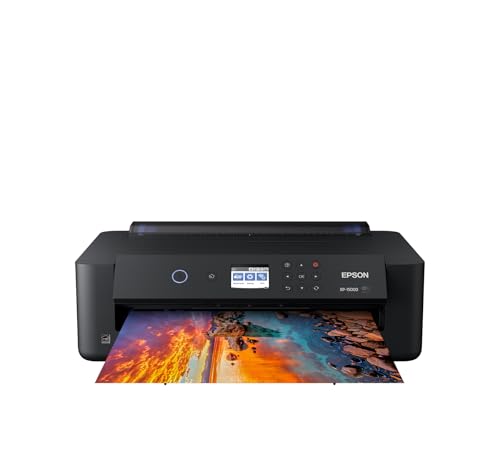
The Epson Expression Photo HD XP-15000 is an ideal choice for photographers seeking ultra HD photo quality in a compact design. This ultra-compact A3+ printer is 30% smaller than its predecessor, making it perfect for tight spaces. You can create stunning borderless prints up to 13 inches x 19 inches using its 6-color Claria Photo HD ink system, which enhances color accuracy, especially in black and white prints. With a 50-sheet rear tray for specialty media and a 200-sheet front tray, it handles various paper types effortlessly. Plus, the Dash Replenishment feature guarantees you never run out of ink unexpectedly.
Best For: Professional photographers and artists looking for high-quality, wide-format printing in a compact design.
Pros:
- High-quality printing: Produces ultra HD photo prints with enhanced color accuracy thanks to the 6-color Claria Photo HD ink system.
- Compact size: 30% smaller footprint compared to its predecessor, making it suitable for small workspaces.
- Convenient media handling: Supports a variety of paper sizes and types, including borderless prints, with a 50-sheet rear tray for specialty media.
Cons:
- Requires genuine cartridges: Use of non-genuine ink may cause damage not covered under warranty.
- Limited to specific ink types: Only compatible with Epson Genuine Cartridges, which may be more expensive than third-party options.
- Setup complexity: May require some technical knowledge to set up and use all features effectively, especially for first-time users.
Factors to Consider When Choosing a Fine Art Photo Printer
When choosing a fine art photo printer, you’ll want to think about several key factors. Print quality, ink system types, and color accuracy can greatly impact your final images. Additionally, consider print size options and connectivity features to guarantee the printer meets your specific needs.
Print Quality Importance
Choosing a fine art photo printer requires careful consideration of print quality, as it plays a pivotal role in how your artwork is perceived. High-resolution printers can produce images up to 2400 x 1200 dpi, ensuring sharp details and vibrant colors. Opt for printers that use pigment-based inks, which enhance durability and maintain color accuracy for decades. A wider color gamut allows for a more precise representation of your artistic vision, capturing subtleties that matter. Additionally, consider the printer’s ability to handle various media types like fine art paper and canvas, as this can greatly affect the final presentation. Consistency in print quality across different materials is essential, so prioritize calibration and quality control in your selection process.
Ink System Types
Several factors influence your decision on ink system types for fine art photo printers, and understanding these can greatly impact your print outcomes. You’ll typically choose between pigment-based and dye-based inks. Pigment inks offer superior longevity and fading resistance, making them ideal for archival prints. They often include multiple colors, enhancing depth and accuracy. On the other hand, dye-based inks produce vibrant colors and smooth gradients, perfect for dynamic imagery. Additionally, consider advanced options like Chroma Optimizer technology, which improves gloss uniformity and scratch resistance. While pigment inks may have a higher initial cost, they often yield more prints over time, affecting your overall cost per print. Choose wisely to match your artistic vision and budget.
Color Accuracy Matters
Color accuracy is essential for fine art photo printing, as it guarantees your printed images reflect the original artwork’s hues, saturation, and tonal range. To achieve this, consider a printer with a robust ink system—those with a wider color gamut, like 9-color or more, can reproduce subtle variations more effectively. High-resolution capabilities, such as 2400 x 1200 dpi, enhance detail and clarity, ensuring accurate color representation. Additionally, opt for printers that utilize pigment-based inks; these not only improve color fidelity but also enhance longevity, reducing fading over time. Finally, don’t overlook calibration tools and software. Aligning your printer, monitor, and other devices will lead to consistent and accurate results, elevating your fine art prints to a professional level.
Print Size Options
When it comes to fine art photo printing, print size options play a significant role in achieving the desired impact of your artwork. You should consider the maximum media size your printer can handle, as options range from A4 (8.3 x 11.7 inches) to larger formats like 13 x 19 inches or even bigger. Look for printers with borderless printing capabilities to eliminate white edges, enhancing your display. Multiple input trays or roll holders can offer versatility for various sizes and media types. Don’t forget to check if the printer can handle specialty media like canvas or fine art paper, as this affects the quality and texture. Finally, consider print speed for larger sizes if time efficiency is a priority in your workflow.
Connectivity Features
How do you guarantee a smooth printing experience with your fine art photo printer? Start by considering the connectivity options available. Look for models with Wi-Fi, USB, and Ethernet capabilities to match your printing environment’s needs. If you want convenience, choose a printer that supports mobile printing features like Apple AirPrint or Android printing, letting you print directly from your smartphone or tablet. Wi-Fi Direct is another great feature, allowing easy wireless connections without a router. Additionally, a printer that supports multiple device connections can streamline your workflow by enabling simultaneous printing from various devices. Finally, built-in card slots and USB ports offer extra flexibility for printing straight from memory cards and USB drives.
Media Handling Capability
While selecting a fine art photo printer, you can’t overlook its media handling capability, as it plays an indispensable role in defining your creative possibilities. A printer’s ability to accommodate various paper sizes and types—like fine art, glossy, and canvas—directly impacts print quality and versatility. Opting for models with larger maximum sheet sizes, such as 13 inches x 19 inches, grants you the freedom to create expansive artwork. Look for printers with multiple input trays, allowing easy switching between different media without constant reloading. Borderless printing is vital for a professional finish, maximizing your paper’s surface. Intelligent features, like automatic media type detection and skew correction, enhance precision and guarantee high-quality results in your prints.
User Interface Design
Selecting a fine art photo printer goes beyond just media handling; the user interface design also plays a significant role in your printing experience. A user-friendly interface with a touch screen or color LCD monitor makes navigation and access to settings quick and easy. Features like ink level monitoring and error notifications enhance your management of print jobs, ensuring smooth operation. Intuitive layouts prioritize frequently used functions, reducing the time you spend on setup and adjustments, which boosts productivity. If you need accessibility, look for interfaces that support multiple languages. Additionally, printers with mobile app integration or wireless connectivity allow you to print directly from your devices, making the whole process seamless and straightforward.
Warranty and Support
When choosing a fine art photo printer, it’s essential to evaluate the warranty and support options available. Look for the length and coverage of the warranty; some models may offer a one-year on-site warranty, while others provide limited coverage. Extensive warranties that cover parts and labor for repairs can save you money in the long run. Manufacturer support for troubleshooting and maintenance is also important, as it enhances your user experience. Confirm customer service is accessible through phone, email, or online chat. Finally, consider the manufacturer’s reputation regarding warranty claims and customer satisfaction; a reliable brand can boost your confidence in your printer’s performance and longevity.