When you’re a photographer, your images represent countless hours of creativity and hard work. To protect that investment, choosing the right RAID storage solution is essential. With so many options available, it can be overwhelming to find the perfect fit for your needs. From performance to capacity, each solution has unique features that can enhance your workflow. Let’s explore the best RAID options that guarantee your images stay safe and secure.
ORICO RAID 5 Bay HDD Enclosure (9858RU3)

The ORICO RAID 5 Bay HDD Enclosure (9858RU3) is an excellent choice for photographers who need a reliable and efficient way to manage large volumes of data. With support for up to 110TB across five 3.5-inch hard drives, you can easily store and backup your stunning images. The enclosure features eight RAID modes, enhancing data security and allowing dual backups. Plus, its USB 3.0 interface guarantees data transfers up to 235MB/s, keeping your workflow smooth. The built-in cooling fan and safety locking mechanisms also protect your drives, making this enclosure a robust solution for your photography needs.
Best For: Photographers and creative professionals who require reliable storage solutions for large data volumes and enhanced data security.
Pros:
- Supports up to 110TB of storage across five 3.5-inch hard drives, allowing for extensive data management.
- Offers eight RAID modes to enhance data security and provide options for dual backups.
- USB 3.0 interface enables fast data transfer speeds of up to 235MB/s, ensuring a smooth workflow.
Cons:
- Weight of 10.41 pounds may make it less portable for on-the-go photographers.
- Requires external power supply, which may not be ideal for users looking for a completely standalone solution.
- Potential complexity in RAID configuration for users unfamiliar with data management systems.
ORICO 4 Bay RAID Hard Drive Enclosure (9848RU3)

For photographers juggling large-scale projects, the ORICO 4 Bay RAID Hard Drive Enclosure (9848RU3) stands out with its impressive maximum storage capacity of 88TB. You can configure it in eight RAID modes, ensuring dual data backup and enhanced security. Compatible with 3.5-inch SATA disks, it supports single disks up to 22TB. The USB 3.0 interface and SATA 6Gbps allow for fast data transfers up to 235 MB/s. With a built-in 150W power supply, it’s compatible with Windows, Mac OS, and Linux. Plus, its aluminum design and cooling fan keep your drives safe and stable during use.
Best For: Photographers and professionals managing large-scale projects requiring extensive data storage and secure backup solutions.
Pros:
- Supports multiple RAID configurations for versatile data management and enhanced security.
- High data transmission rate of up to 235 MB/s facilitates quick file transfers, ideal for high-definition video editing.
- Aluminum design with effective cooling features ensures long-term stability and protection for your hard drives.
Cons:
- Requires 3.5-inch SATA disks, which may limit compatibility with other drive sizes.
- Initial setup and configuration of RAID modes may be complex for less tech-savvy users.
- Bulkier than single-drive enclosures, making it less portable for on-the-go usage.
Oyen Digital 10TB MiniPro RAID V4 USB-C Portable Dual Hard Drive

Photographers seeking a reliable and portable storage solution will appreciate the Oyen Digital 10TB MiniPro RAID V4 USB-C Dual Hard Drive. With a massive 10TB capacity, this dual hard drive features two 5TB HDDs that keep your images safe. The USB-C connectivity guarantees compatibility with all USB devices, including Thunderbolt 3 and 4, making it versatile for any setup. You can choose from different configurations like JBOD, RAID 0, RAID 1, or BIG modes without needing extra software. It’s bus-powered or can use an external adapter, and with a 3-year warranty, you can trust its durability.
Best For: Photographers and creative professionals who need a high-capacity, portable storage solution for their work.
Pros:
- Massive 10TB capacity with dual 5TB HDDs ensures ample space for storing large files.
- Versatile connectivity via USB-C makes it compatible with various devices, including Thunderbolt 3 and 4.
- Configurable modes (JBOD, RAID 0, RAID 1, BIG) allow for flexibility in data management without the need for additional software.
Cons:
- Bus-powered may not provide enough power for all setups in high-demand scenarios.
- Weight and size may be less portable compared to single-drive options.
- Higher price point compared to non-RAID portable drives may not fit all budgets.
SanDisk Professional 24TB G-RAID Mirror 2-Bay Array for Data Backup and Storage

When it comes to reliable and high-capacity storage, the SanDisk Professional 24TB G-RAID Mirror 2-Bay Array stands out as an ideal solution for creative professionals. With 24TB of space (2 x 12TB), you can easily manage large photo collections. The RAID 1 configuration automatically duplicates your data for added safety, and you can switch to RAID 0 or JBOD effortlessly. Thanks to Thunderbolt 3 connectivity, you’ll enjoy fast transfer speeds, plus the PRO-BLADE SSD Mag slot allows for quick content offloading. This setup supports daisy-chaining, making it perfect for photographers needing efficient, high-performance storage.
Best For: Creative professionals and photographers who require reliable, high-capacity storage solutions for managing large data sets.
Pros:
- Automatic data duplication through RAID 1 configuration enhances data safety and security.
- Thunderbolt 3 connectivity enables incredibly fast transfer speeds of up to 40Gbps.
- Versatile RAID options allow users to easily switch between RAID 1, RAID 0, or JBOD without the need for special software.
Cons:
- The initial cost may be high for some users, as it is designed for professional-grade storage.
- RAID 1 configuration limits usable capacity to 12TB due to data mirroring.
- Requires a Thunderbolt 3-compatible device for optimal performance, which may not be available to all users.
SanDisk Professional G-RAID Shuttle 4TB External Hard Drive (SDPH34H-048T-NBAAB)
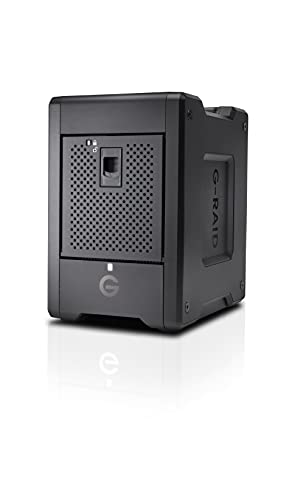
The SanDisk Professional G-RAID Shuttle 4TB External Hard Drive stands out for its massive 48TB storage capacity, making it an ideal choice for those who require robust data management in high-demand environments. Its transportable design allows you to take your data wherever you go. With Thunderbolt 3 and USB-C connectivity, you’ll enjoy lightning-fast transfer speeds, perfect for multi-stream 4K, 8K, and VR workflows. The device comes pre-configured with RAID 5, but you can switch to RAID 0, 1, 10, or JBOD as needed. Plus, it’s compatible with Mac and Windows, backed by a 5-year limited warranty.
Best For: Professionals and creatives in need of high-capacity, portable storage for demanding applications like 4K, 8K, and VR workflows.
Pros:
- Massive 48TB storage capacity allows for extensive data management.
- Thunderbolt 3 and USB-C connectivity provide high-speed transfer rates.
- Flexible RAID configurations (RAID 5 out of the box) support various data protection needs.
Cons:
- Higher initial cost compared to standard external hard drives.
- Transportable design may still be bulkier than smaller alternatives.
- Requires reformatting for Windows compatibility, which may be inconvenient for some users.
Glyph Blackbox PRO RAID Thunderbolt 3 Desktop 8 TB

For creative professionals who demand both speed and reliability, the Glyph Blackbox PRO RAID Thunderbolt 3 Desktop with 8TB of storage is an ideal solution. Featuring dual 4TB 7,200 RPM drives, it offers impressive performance with Thunderbolt 3 speeds up to 40 Gbps and USB-C 3.2 Gen 2 ports. You can easily switch between RAID configurations, choosing RAID 0 for maximum speed or RAID 1 for best data protection. Its fan-assisted aluminum case guarantees quiet, stable operation, making it perfect for long editing sessions. Plus, setup is a breeze with included certified cables, compatible with both Mac and Windows systems.
Best For: Creative professionals in photography and video who require high-speed data transfer and reliable storage solutions.
Pros:
- High-speed performance with Thunderbolt 3 speeds up to 40 Gbps.
- Versatile RAID configurations allow users to choose between speed (RAID 0) and data protection (RAID 1).
- Quiet and stable operation due to the fan-assisted aluminum case, ideal for extended use.
Cons:
- Higher price point compared to standard external drives.
- Limited to 8TB storage capacity, which may not be sufficient for all users.
- Potential compatibility issues with older systems that do not support Thunderbolt 3 or USB-C.
G-Technology 8TB G-SPEED Shuttle SSD with Thunderbolt 3
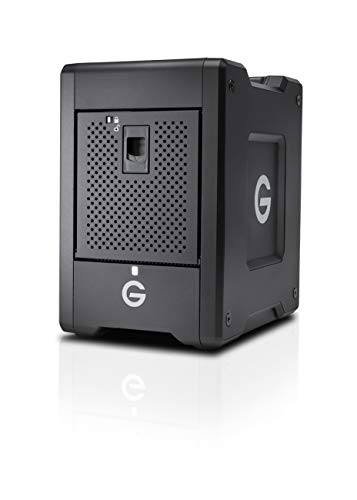
Photographers on the move will find the G-Technology 8TB G-SPEED Shuttle SSD with Thunderbolt 3 an excellent choice, thanks to its transportable design that makes traveling from studio to location seamless. With sustained transfer rates up to 2800MB/s, it’s optimized for multi-stream 4K, 8K, and VR workflows. The built-in hardware RAID supports RAID 0, 1, 5, 10, and 50, ensuring your data remains secure. Plus, with dual Thunderbolt 3 ports, you can easily daisy-chain devices, while still being backwards compatible with Thunderbolt 2. This combination of speed and versatility makes it perfect for any photographer on the go.
Best For: Photographers and content creators seeking a high-speed, portable storage solution for 4K, 8K, and VR workflows.
Pros:
- Sustained transfer rates up to 2800MB/s for efficient data handling.
- Built-in hardware RAID options ensure data security and flexibility.
- Dual Thunderbolt 3 ports allow for easy daisy-chaining and backward compatibility with Thunderbolt 2.
Cons:
- Higher price point compared to traditional hard drives.
- Limited to Thunderbolt connections, which may not be available on all devices.
- Bulkier than typical portable SSDs, which may impact portability for some users.
Factors to Consider When Choosing Raid Storage for Photographers
When choosing RAID storage, you need to think about several key factors that affect your workflow. Consider your storage capacity requirements, RAID configuration options, and data transfer speeds. Don’t forget to check connectivity compatibility and the cooling design to guarantee peak performance.
Storage Capacity Requirements
How do you determine your storage capacity needs as a photographer? Start by evaluating the average size of your files. High-resolution images and videos often demand much more space than standard files. Consider future growth too; as your projects expand in size and complexity, you’ll need a scalable solution. Remember that RAID configurations can impact storage capacity. For instance, RAID 1 mirrors data, offering less usable space compared to RAID 0, which maximizes capacity without redundancy. If you tackle extensive projects, look for RAID systems that support large volumes, with some configurations allowing up to 110TB. Opting for drives with individual capacities up to 22TB can give you the flexibility to accommodate your larger files and projects.
RAID Configuration Options
Choosing the right RAID configuration for your storage needs can greatly affect your workflow and data security. For instance, RAID 0 boosts speed by striping data across multiple drives, making it ideal for quick access but lacking redundancy. If you prioritize data safety, RAID 1 mirrors your data, ensuring availability if a drive fails. RAID 5 offers a balance, combining speed and redundancy through distributed parity, allowing recovery if one drive goes down. Meanwhile, RAID 10 merges the benefits of RAID 0 and RAID 1, delivering high performance with added security. If you prefer flexibility, consider JBOD, which lets you use individual drives without RAID configurations, catering to varying storage needs.
Data Transfer Speeds
Data transfer speeds are vital for photographers who often work with large files from high-resolution cameras or multi-stream video projects. High-performance RAID systems can reach peak speeds up to 2800MB/s, greatly enhancing your workflow. While USB 3.0 interfaces offer rates up to 235MB/s, they may not be fast enough for demanding tasks. Thunderbolt 3 technology, on the other hand, provides speeds of up to 40Gbps, making it ideal for rapid file transfers. Your RAID configuration also plays an important role; for example, RAID 0 prioritizes speed by striping data across multiple drives, whereas RAID 1 focuses on redundancy. Choosing the right combination guarantees you can edit and back up large volumes of photos and videos quickly and efficiently.
Connectivity Compatibility
When looking for RAID storage solutions, connectivity compatibility plays a significant role in ensuring your setup meets your needs. You’ll want a system that supports USB 3.0 or Thunderbolt 3 for high-speed data transfers—up to 40Gbps with Thunderbolt 3 can make a big difference. Make sure it’s compatible with various operating systems like Windows, Mac OS, and Linux to integrate seamlessly into your workflow. Additionally, consider the ability to daisy-chain multiple devices using Thunderbolt 3 for expanded storage options. It’s also wise to check for backward compatibility with older USB and Thunderbolt versions, maximizing versatility. Finally, look for RAID systems that offer both bus-powered and external adapter options, especially if you need portability.
Cooling and Design
Effective cooling and thoughtful design are essential elements to evaluate for RAID storage solutions tailored to photographers. Overheating can lead to data loss, so look for systems with aluminum cases and built-in fans that enhance heat dissipation. A well-designed RAID enclosure should have front and rear vents to promote ideal airflow, ensuring stability during intensive use. The choice of materials, like aluminum, increases durability and makes your setup more portable. Additionally, an independent safety locking mechanism can prevent accidental disk removal, safeguarding your data integrity. Finally, a design that allows for easy disassembly and assembly will let you swap drives or perform maintenance quickly, keeping your workflow smooth and efficient.
Portability and Weight
Choosing the right RAID storage for your photography needs often hinges on portability and weight. Heavier devices can be cumbersome, especially when you’re frequently on the move. Opt for compact RAID storage that’s easy to pack and handle during shoots or travel. Look for systems designed specifically for transport; they typically use durable materials and lightweight construction to tackle mobility challenges. Make sure the dimensions fit comfortably within your carrying capacity, particularly when you’re juggling cameras and lenses. Many portable RAID options are bus-powered, so you won’t need an external power adapter, simplifying your setup during on-location shoots. Prioritizing these factors will help you keep your images safe without sacrificing convenience.
Power Supply Considerations
After considering portability and weight, another key aspect is the power supply for your RAID storage solution. A robust power supply is essential for supporting multiple high-performance hard drives, guaranteeing peak performance during intensive data operations. Look for RAID enclosures with built-in power supplies rated at 150W to secure stable power delivery during multi-disk reading and writing activities. You should also consider power redundancy features, like dual power supply options, to enhance reliability and protect against data loss during power failures. Verify compatibility with your operating system to avoid extra requirements for power adapters, streamlining your setup. Finally, evaluate energy consumption—efficient power usage can reduce operational costs while maintaining high performance.
Warranty and Support Options
When investing in RAID storage solutions, it’s essential to evaluate warranty and support options, as these can greatly influence your workflow and peace of mind. A warranty period typically ranges from 3 to 5 years, giving you assurance against manufacturing defects and potential failures. Look for support options that include customer service availability for troubleshooting, especially during vital projects or tight deadlines. Some manufacturers offer extended warranty or support plans that provide additional coverage beyond the standard period. Additionally, having access to online resources like FAQs and user manuals can enhance your experience and deliver quick solutions to common issues. A robust warranty and support system minimizes downtime and protects your valuable data, essential for your photography business.