When it comes to color grading, choosing the right monitor is essential for achieving stunning visual precision. In 2025, the landscape of professional monitors is set to evolve, offering features that cater specifically to your creative needs. From remarkable resolutions to expansive color gamuts, these monitors promise to elevate your editing experience. Curious about which models are leading the charge and what factors you should consider? Let’s explore the top contenders together.
ASUS ProArt Display 27” 5K HDR Professional Monitor (PA27JCV)

The ASUS ProArt Display 27” 5K HDR Monitor (PA27JCV) is a top choice for professional color graders and creatives who demand unparalleled color accuracy. With its stunning 27-inch 5K resolution and IPS panel, you’ll enjoy vibrant visuals from every angle. It boasts a wide color gamut, covering 99% DCI-P3 and 100% sRGB, ensuring your work looks true to life. Calman Verified, this monitor comes factory pre-calibrated for precise color accuracy. Plus, the USB-C PD 96W connectivity simplifies your workspace. A 3-year warranty and complimentary 3-month Adobe Creative Cloud access further enhance its value for professionals like you.
Best For: Professionals in color grading and creative fields seeking exceptional color accuracy and high-resolution displays.
Pros:
- 27-inch 5K resolution provides stunning detail and clarity for intricate designs.
- Factory pre-calibrated to ΔE < 2, ensuring precise color reproduction for professional use.
- USB-C PD 96W connectivity allows for simplified workspace setup and power delivery.
Cons:
- May be more expensive than standard monitors, which could be a barrier for casual users.
- Requires a powerful graphics card to fully utilize its 5K capabilities.
- Limited to a specific screen size, which may not suit all users’ preferences.
ASUS ProArt Display PA278QV 27” WQHD Monitor

For colorists and graphic designers seeking unparalleled accuracy in their work, the ASUS ProArt Display PA278QV 27” WQHD Monitor stands out with its impressive 100% sRGB and 100% Rec. 709 color gamut. This 2560 x 1440 monitor features a frameless design and a Calman Verified factory calibration, ensuring a Delta E < 2 color accuracy. The IPS panel offers exceptional viewing angles and image quality, enhanced by its anti-glare feature. With versatile connectivity options, including Mini DisplayPort and HDMI, plus four USB 3.0 ports, it provides maximum flexibility. You’ll also enjoy three months of complimentary Adobe Creative Cloud access.
Best For: Colorists and graphic designers who require high color accuracy and a wide color gamut for their work.
Pros:
- 100% sRGB and 100% Rec. 709 color gamut for exceptional color reproduction.
- Calman Verified factory calibration ensuring Delta E < 2 color accuracy.
- Versatile connectivity options including Mini DisplayPort, HDMI, and four USB 3.0 ports.
Cons:
- May be pricier compared to standard monitors without advanced color features.
- The 27” size may not be suitable for all workspace setups.
- Limited adjustment options for height and tilt compared to some other monitors.
LG 32U990A-S 32-Inch Ultrafine 6K Professional Monitor
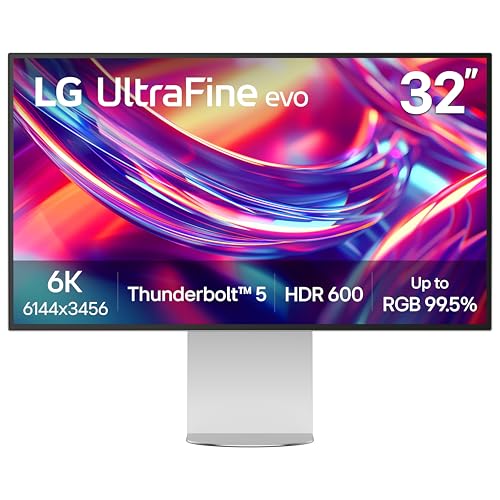
If you’re a creative professional in need of impeccable color accuracy and detail, the LG 32U990A-S 32-Inch Ultrafine 6K Professional Monitor stands out as a top contender. With a stunning 6144 x 3456 resolution and 224 PPI, it delivers over 21 million pixels for unmatched clarity. Its Nano IPS Black technology and 2000:1 contrast ratio guarantee vibrant colors, achieving up to 99.5% Adobe RGB. Plus, with Thunderbolt 5 compatibility, you can daisy chain multiple monitors effortlessly. Ergonomic adjustments and TÜV Rheinland certification enhance user comfort, making this monitor an exceptional choice for any demanding creative workflow.
Best For: Creative professionals seeking unparalleled color accuracy and detail in their visual work.
Pros:
- Exceptional resolution of 6144 x 3456 and 224 PPI for stunning clarity and detail.
- Vibrant color accuracy with up to 99.5% Adobe RGB and 2000:1 contrast ratio for immaculate visuals.
- Ergonomic design with adjustable features and TÜV Rheinland Eye Comfort certification for reduced eye strain.
Cons:
- High price point may not be suitable for casual users or those on a budget.
- Limited gaming features compared to monitors specifically designed for gaming.
- Large size may require ample desk space and can be cumbersome in smaller setups.
BenQ SW272Q 27-inch 2K Photographer Monitor

Designed specifically for photographers and creative professionals, the BenQ SW272Q 27-inch 2K Photographer Monitor delivers exceptional color accuracy and vibrant imagery that enhances your artistic vision. With a 99% Adobe RGB and 98% DCI-P3 color gamut, it guarantees vivid color reproduction. The Nano Matte Panel reduces glare, while HDR capability adds depth to your visuals. You’ll appreciate the hardware calibration with Palette Master Ultimate, making adjustments 40% faster. Its empathetic design fosters creativity, allowing you to connect emotionally with your work. This monitor’s immersive display transforms every pixel into a tool for artistic expression, guaranteeing high-quality professional deliverables every time.
Best For: Photographers and creative professionals seeking precise color accuracy and immersive visual experiences in their work.
Pros:
- Exceptional color accuracy with 99% Adobe RGB and 98% DCI-P3 color gamut.
- Hardware calibration with Palette Master Ultimate for faster adjustments.
- Empathetic design that enhances comfort and fosters creativity.
Cons:
- Higher price point compared to standard monitors.
- Limited to 27-inch screen size, which may not suit all users.
- HDR capability may require additional setup for optimal performance.
BenQ PD3225U 32 Inch 4K IPS Thunderbolt Monitor

The BenQ PD3225U 32 Inch 4K IPS Thunderbolt Monitor stands out for its impressive color accuracy, making it a top choice for creative professionals and Mac users who demand precision in their work. With 98% P3 and 100% sRGB coverage and a contrast ratio of 2000:1, you’ll see true-to-life colors. Its Thunderbolt 3 connectivity allows for seamless data transfer and charging, while the adjustable ergonomic design guarantees comfort during long hours. Plus, features like Display Pilot 2 software and a Hotkey Puck simplify your workflow, making it easier to manage your creative projects efficiently.
Best For: Creative professionals and Mac users who require high color accuracy and reliable performance in their work.
Pros:
- Pantone Validated and Calman verified color accuracy ensures true-to-life visuals.
- Thunderbolt 3 connectivity provides fast data transfer and charging capabilities.
- Ergonomic design with adjustable features enhances comfort during long working hours.
Cons:
- Higher price point compared to standard monitors may not fit all budgets.
- Potentially limited compatibility with non-Mac devices due to specific features.
- Size may be cumbersome for smaller workspaces or setups.
Calibrite ColorChecker Passport Photo 2 (CCPP2)
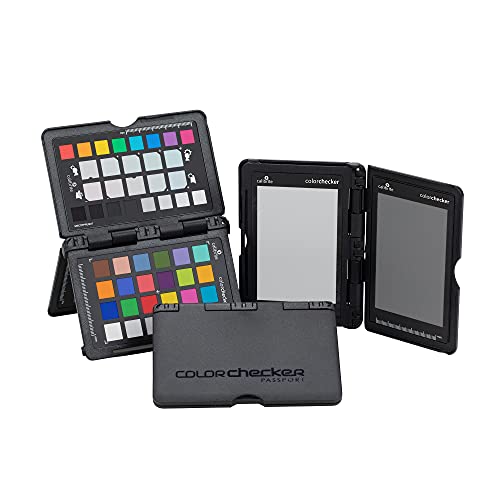
For photographers seeking precise color accuracy and consistency, the Calibrite ColorChecker Passport Photo 2 (CCPP2) stands out as an essential tool. You can set exposure using an in-camera or handheld meter and create a custom white balance to maintain a consistent white point across your images. The CCPP2 allows you to develop tailored camera profiles for various camera/lens/lighting combinations, supporting DNG and ICC workflows. With enhancement patches, you can neutralize colors and control shifts for better quality. Plus, its portable case and lanyard make it easy to incorporate into any scene, ensuring convenience wherever you shoot.
Best For: Photographers who require precise color accuracy and consistency in their images.
Pros:
- Offers customizable white balance and exposure settings for improved image quality.
- Supports tailored camera profiles for different camera/lens/lighting combinations.
- Portable design with a protective case and lanyard for easy accessibility during shoots.
Cons:
- May require a learning curve for photographers unfamiliar with color calibration tools.
- Custom profiles might need adjustments for varying lighting conditions.
- Higher price point compared to basic color-checking tools.
ASUS ProArt Display 34” Ultrawide Curved Professional HDR Monitor (PA34VCNV)

If you’re a professional colorist or photographer seeking exceptional color accuracy, the ASUS ProArt Display 34” Ultrawide Curved Professional HDR Monitor (PA34VCNV) stands out with its impressive 100% sRGB and 100% Rec. 709 color coverage. This 34.1-inch curved IPS display boasts a resolution of 3440 x 1440, ensuring stunning visuals. With Calman verification and factory calibration, you can trust its ΔE < 2 color accuracy. Connectivity is seamless, featuring DisplayPort over USB-C, HDMI, and a USB hub. Plus, its ergonomic design allows for tilt, swivel, and height adjustments, enhancing your comfort during long editing sessions. Enjoy a complimentary Adobe Creative Cloud access too!
Best For: Professionals in photography and color grading who require high color accuracy and a wide viewing area for detailed work.
Pros:
- 100% sRGB and 100% Rec. 709 color coverage ensures exceptional color accuracy for professional use.
- Ergonomic design with tilt, swivel, and height adjustments promotes comfort during long editing sessions.
- Extensive connectivity options including DisplayPort over USB-C and HDMI facilitate easy integration into various setups.
Cons:
- Limited to 3440 x 1440 resolution, which may not satisfy users looking for 4K or higher resolutions.
- Curved design might not appeal to everyone and can create distortion in certain viewing angles.
- Higher price point compared to standard monitors, which may be a consideration for budget-conscious buyers.
ViewSonic 15.6 Inch 4K Portable OLED Monitor

Designed for professionals on the go, the ViewSonic 15.6 Inch 4K Portable OLED Monitor delivers stunning visuals in a compact form. Weighing just 1.5 lbs and only 0.6 inches thick, it easily fits in your backpack or purse. With a 60Hz refresh rate, you’ll enjoy smooth, vibrant images. Its USB-C connectivity guarantees fast data transfer and 60W charging, while Mini-HDMI compatibility broadens your options. Plus, dual speakers enhance your audio experience. With a durable screen cover and built-in stand for portrait and landscape use, it’s versatile for any setting. Enjoy peace of mind with a 3-year warranty and excellent customer support.
Best For: Professionals and creatives who need a portable, high-resolution display for on-the-go productivity.
Pros:
- Ultra-portable design allows easy transport and setup anywhere.
- High 4K resolution provides stunning visuals and vibrant colors.
- Versatile connectivity options with USB-C and Mini-HDMI support facilitate compatibility with various devices.
Cons:
- Limited screen size may not be ideal for extensive multitasking.
- Higher price point compared to standard monitors may deter budget-conscious buyers.
- Built-in speakers may not match the quality of dedicated external audio systems.
ASUS ProArt 14” Portable Touchscreen Monitor (PA148CTV)

The ASUS ProArt 14” Portable Touchscreen Monitor (PA148CTV) stands out as an excellent choice for professionals in color grading due to its impressive color accuracy, boasting a ΔE of less than 2. With a 14-inch Full HD IPS anti-glare panel, you’ll enjoy vibrant visuals and a wide viewing angle of 178°. It covers 100% sRGB and Rec. 709, ensuring precision in your work. The monitor features two USB Type-C ports and a Micro HDMI for versatile connectivity. Plus, its TÜV Rheinland-certified technologies make it easy on your eyes, letting you work comfortably for hours on end.
Best For: Professionals in color grading and creative industries who need accurate color representation and portability.
Pros:
- Highly accurate color performance with a ΔE of less than 2, ideal for color-critical work.
- Portable design with a 14-inch size and lightweight build, perfect for on-the-go use.
- Multiple connectivity options, including USB Type-C and Micro HDMI, for versatile device compatibility.
Cons:
- Limited screen size may not be suitable for users requiring a larger display for multitasking.
- Full HD resolution might not meet the needs of users looking for 4K clarity.
- The touchscreen functionality may not be essential for all users, potentially adding to the cost.
FEELWORLD FVM215 High Bright Production Broadcast Studio Monitor

For professionals working in demanding lighting conditions, the FEELWORLD FVM215 High Bright Production Broadcast Studio Monitor stands out with its impressive 1000nit brightness. This 21.5-inch monitor delivers accurate colors and sharp details, thanks to its 4K resolution and factory color calibration via CALMAN software. You’ll appreciate the dual-interface design, featuring HDMI and 3G-SDI, which enhances signal transmission between your camera and recorder. With shooting assistance tools like focus assist and false color, it boosts your shooting efficiency. Included accessories guarantee you’re ready to go right away, making this monitor a top choice for serious color grading professionals.
Best For: Professionals working in demanding lighting conditions who require accurate color reproduction and sharp display details for video production.
Pros:
- Excellent brightness of 1000nit, making it ideal for use in bright environments.
- Factory color calibration via CALMAN software ensures high color accuracy and reproduction.
- Versatile connectivity options with HDMI and 3G-SDI interfaces enhance compatibility with various devices.
Cons:
- The 21.5-inch size may be too small for some users who prefer larger monitors for detailed editing.
- Higher brightness and advanced features may come with a higher price point compared to standard monitors.
- Limited to 4K resolution at 60Hz, which may not meet the needs of users requiring higher refresh rates for fast-paced content.
Factors to Consider When Choosing a Professional Color Grading Monitor
When choosing a professional color grading monitor, you’ll want to focus on several key factors. Color accuracy standards, display resolution, and calibration options are essential for achieving the best results. Additionally, consider the types of panel technology and available connectivity options to guarantee compatibility with your workflow.
Color Accuracy Standards
Choosing a professional color grading monitor involves careful consideration of color accuracy standards, as these factors considerably impact your workflow. Look for monitors with a Delta E (ΔE) value under 2, ensuring superior color fidelity. A wide color gamut, like 99% Adobe RGB or 100% sRGB, is essential for reproducing a broader range of colors, critical for accurate grading. Regular calibration using tools like CalMAN helps maintain consistent results across different viewing conditions. Additionally, consider monitors that support HDR (High Dynamic Range) for enhanced brightness and color range, crucial for film and photography. Finally, built-in color management features, such as hardware calibration capabilities, will provide tailored precision for your specific projects.
Display Resolution Importance
While selecting a professional color grading monitor, display resolution plays a crucial role in your editing process. Higher resolutions like 4K and 5K provide more pixel density, leading to sharper images and greater detail essential for precise color grading. A 5K monitor (5120 x 2880) showcases over 14 million pixels, allowing you to see more information in your projects compared to standard 1080p or 4K displays. This clarity enables you to spot fine details and color inconsistencies more easily during the grading process. As media formats evolve, investing in higher-resolution monitors future-proofs your workflow, accommodating detailed content without sacrificing quality. Monitors with resolutions like 6K or 8K also deliver a wider color range, enhancing precision in professional editing environments.
Calibration and Profiling
Accurate color reproduction is essential for professional color grading, making calibration and profiling key factors in your monitor selection. Aim for a target Delta E of less than 2, which indicates high fidelity in color representation. Many advanced monitors come factory-calibrated, ensuring reliable color accuracy right out of the box—crucial for your work. Consider using hardware calibration tools to create custom profiles tailored to your specific lighting conditions, enhancing color consistency across devices. Opt for monitors with wide color gamuts, like 99% Adobe RGB or DCI-P3, for vibrant and precise grading. Regular profiling and calibration are necessary, as display characteristics can drift over time due to age or environmental factors, helping you maintain ideal color accuracy.
Connectivity Options Available
When selecting a professional color grading monitor, connectivity options play a crucial role in ensuring seamless integration with your workflow. Look for monitors that offer multiple connections like HDMI, DisplayPort, and USB-C to guarantee compatibility with various devices. Support for Thunderbolt technology can enhance productivity through high-speed data transfer and power delivery while reducing cable clutter. If you plan to expand your setup, consider monitors with daisy-chain capabilities, allowing you to connect multiple displays with a single cable. It’s also essential to have at least one USB hub with multiple ports to easily connect peripherals like keyboards and external drives. Finally, evaluate the monitor’s support for different video resolutions and refresh rates for peak performance in your color grading tasks.
Panel Technology Types
Choosing the right panel technology is essential for achieving precise color grading results. IPS (In-Plane Switching) panels are often your best bet, as they offer wide viewing angles and excellent color accuracy, making them ideal for professional tasks. If you want stunning blacks and vibrant colors, consider OLED technology, which enhances visual detail with its high contrast ratios. VA (Vertical Alignment) panels provide better contrast than IPS and TN, aiding in shadow detail. While TN (Twisted Nematic) panels deliver faster response times, they often sacrifice color accuracy and viewing angles, making them less suitable for your needs. Ultimately, look for HDR (High Dynamic Range) support to access a wider range of colors and brightness levels for dynamic grading results.
Size and Ergonomics
While size and ergonomics might seem like secondary considerations, they play an essential role in your color grading workflow. A larger monitor, ideally 27 inches or more, gives you ample workspace for detailed editing and multitasking across multiple windows. Ergonomics matter too; adjustable stands that allow you to tilt, swivel, and height-adjust your monitor can prevent strain during long sessions. Look for wide viewing angles—about 178 degrees—to maintain consistent color representation from various positions, especially in collaborative settings. Additionally, consider an ultrawide aspect ratio (21:9) for improved timeline management. Finally, anti-glare features are vital for reducing reflections in brightly lit environments, enhancing your visibility and productivity when fine-tuning those colors.
Additional Features Required
To achieve the best results in color grading, you need to contemplate several additional features that can greatly impact your workflow. First, look for monitors with high color accuracy, aiming for a Delta E of less than 2 for consistent color reproduction. A wide color gamut—99% Adobe RGB and 98% DCI-P3—is essential to accurately represent the full spectrum of colors. HDR capabilities enhance dynamic range and contrast, making images more vivid and realistic. Ergonomic features like tilt, swivel, and height adjustments improve comfort during long editing sessions, helping you maintain focus. Finally, make certain your monitor has versatile connectivity options, such as USB-C, Thunderbolt, and multiple HDMI/DisplayPort inputs, for compatibility with various devices and workflows.