If you’re serious about photography, you know that achieving accurate colors is essential for your editing process. Choosing the right monitor can make a significant difference in how your images come to life. With options like the ASUS ProArt PA278QV and BenQ PD2706U, you can expect impressive color fidelity and sharp detail. But what features should you really be looking for in a monitor to elevate your workflow? Let’s explore the best options available.
ASUS ProArt Display PA278QV 27” WQHD Monitor

If you’re a photographer seeking exceptional color accuracy, the ASUS ProArt Display PA278QV 27” WQHD monitor is an outstanding choice. With a resolution of 2560 x 1440, this frameless display features a 100% sRGB and 100% Rec. 709 wide color gamut. You’ll appreciate the factory calibration that guarantees a Delta E < 2 for precise color representation. The IPS panel offers excellent viewing angles and an anti-glare finish, perfect for editing. Plus, with extensive connectivity options like Mini DisplayPort, HDMI, and four USB 3.0 ports, you’ve got all the flexibility you need. Enjoy a 3-month Adobe Creative Cloud access too!
Best For: Photographers and creative professionals seeking exceptional color accuracy and flexibility in their display options.
Pros:
- 100% sRGB and Rec. 709 color gamut ensures vibrant and accurate colors for professional editing.
- Factory calibration with Delta E < 2 provides precise color representation right out of the box.
- Extensive connectivity options including multiple ports and USB 3.0 for versatile connections.
Cons:
- Limited refresh rate may not satisfy gamers looking for high-performance gaming capabilities.
- No built-in speakers may require additional audio equipment for multimedia use.
- Size may be too large for smaller workspaces or setups.
BenQ PD2706U 27-inch 4K Monitor

The BenQ PD2706U 27-inch 4K Monitor is an exceptional choice for photographers seeking precise color accuracy. With 95% P3 and 99% sRGB/Rec.709 coverage, you’ll enjoy stunning visuals. Its IPS panel guarantees Delta E ≤ 3 accuracy, and it’s Pantone validated, making it perfect for your editing tasks. The 90W USB-C connection simplifies your setup, allowing you to charge devices while syncing data. Plus, with factory-calibrated modes like Darkroom and CAD/CAM, you can tailor your experience. The ergonomics and eye-care technology keep you comfortable and focused, enhancing your creativity without the strain. This monitor truly elevates your editing experience.
Best For: Photographers and creative professionals who require precise color accuracy and advanced connectivity for their editing tasks.
Pros:
- Factory-calibrated color modes ensure accurate color representation for editing.
- 90W USB-C connectivity allows for easy data synchronization and device charging with a single cable.
- Ergonomic design and eye-care technology enhance comfort during long editing sessions.
Cons:
- DisplayHDR 400 may not be sufficient for highly demanding HDR content creators.
- Limited screen size (27 inches) might not be ideal for users who prefer larger displays for multitasking.
- The monitor may be more expensive compared to basic models with similar resolutions but less specialized features.
ASUS ProArt Display PA247CV 24-inch Monitor

For photographers seeking exceptional color accuracy, the ASUS ProArt Display PA247CV 24-inch monitor stands out as an ideal choice. This Full HD (1920 x 1080) display features an IPS panel with a 178° wide viewing angle, ensuring vibrant visuals. With 100% sRGB and 100% Rec. 709 color gamut coverage, it delivers impressive accuracy, boasting a Delta E < 2. You’ll appreciate its extensive connectivity options, including DisplayPort over USB-C with 65W Power Delivery, HDMI, and a USB 3.1 hub. Plus, you’ll get a 3-month complimentary access to Adobe Creative Cloud, enhancing your editing experience even further.
Best For: Photographers and creatives who demand exceptional color accuracy and vibrant visuals for their work.
Pros:
- Excellent color accuracy with Delta E < 2, ensuring true-to-life colors.
- Wide viewing angles (178°) provided by the IPS panel, making it suitable for collaborative work.
- Includes a 3-month complimentary access to Adobe Creative Cloud for enhanced editing capabilities.
Cons:
- Limited to Full HD resolution (1920 x 1080), which may not satisfy users seeking higher resolutions.
- The 24-inch size may feel small for users accustomed to larger screens for multitasking.
- Some users may find the USB-C power delivery feature less useful if they do not have compatible devices.
BenQ SW272Q 27-inch 2K Photographer Monitor

Photographers seeking unparalleled color accuracy will appreciate the BenQ SW272Q 27-inch 2K Photographer Monitor. With its 2K QHD resolution and a stunning 99% Adobe RGB coverage, you’ll experience vivid, true-to-life colors. The Nano Matte Panel, certified for anti-reflection, guarantees clarity without distractions. Plus, BenQ’s Paper Color Sync technology assures screen-to-print consistency, making your editing seamless. The monitor’s empathetic design fosters creativity, while hardware calibration with Palette Master Ultimate software accelerates your workflow. Each pixel enhances your artistic vision, resulting in professional-quality deliverables that resonate with depth and precision. This monitor is a game-changer for serious photographers.
Best For: Photographers and creative professionals seeking unparalleled color accuracy and professional-quality editing capabilities.
Pros:
- Exceptional color accuracy with 99% Adobe RGB and 98% DCI-P3 coverage for vivid and true-to-life colors.
- Hardware calibration with Palette Master Ultimate software ensures consistent color reproduction and faster workflow.
- Empathetic design and Nano Matte Panel enhance user experience by reducing glare and distractions.
Cons:
- The 27-inch size may be too small for some users who prefer larger displays for extensive editing work.
- Higher price point compared to standard monitors, which may not be suitable for casual users.
- HDR capability might require additional setup and adjustments for optimal performance.
ASUS ProArt Display 27″ Monitor PA278CV

If you’re a creative professional seeking precision in your work, the ASUS ProArt Display 27″ Monitor PA278CV stands out with its exceptional color accuracy. Featuring a WQHD (2560 x 1440) IPS panel, you’ll enjoy stunning visuals from a wide 178° viewing angle. It covers 100% of sRGB and Rec. 709 color gamuts, ensuring your edits look true-to-life. With a refresh rate of 75Hz and Adaptive-Sync technology, your experience is smooth and seamless. The monitor also boasts extensive connectivity options and ergonomic adjustments, along with three months of complimentary Adobe Creative Cloud access, enhancing your editing workflow considerably.
Best For: Creative professionals seeking precise color accuracy and high-quality visuals for editing and design work.
Pros:
- Exceptional Color Accuracy: 100% sRGB and Rec. 709 coverage with excellent Delta E < 2.
- Versatile Connectivity: Extensive options including DisplayPort, HDMI, and USB 3.1, along with daisy-chaining capability.
- Ergonomic Design: Height adjustable stand and eye care features for reduced strain during long working hours.
Cons:
- Limited Refresh Rate: While 75Hz is decent, competitive gaming monitors often offer higher refresh rates.
- Size Limitation: The 27-inch display may feel small for some users who prefer larger screens for multitasking.
- No Built-in Speakers: Lacks integrated audio, requiring external speakers or headphones for sound.
LG 27US500-W Ultrafine 27-Inch 4K UHD Monitor

The LG 27US500-W Ultrafine 27-Inch 4K UHD Monitor stands out with its impressive 4K resolution, making it an exceptional choice for creative professionals who demand precise color accuracy in their work. With a 1000:1 contrast ratio and support for HDR10, it delivers deeper blacks and vivid colors that bring your images to life. The monitor’s borderless design not only enhances its aesthetic appeal but also maximizes your viewing area. Ergonomic tilt adjustments guarantee you find the perfect angle for editing. Plus, the Onscreen Control feature allows for easy customization, making this monitor a must-have for your editing setup.
Best For: Creative professionals requiring high-resolution displays for detailed digital imagery.
Pros:
- Impressive 4K UHD resolution (3840×2160) delivers exceptional clarity and detail.
- Supports HDR10 with up to 90% DCI-P3 color gamut expression for vibrant colors.
- Ergonomic stand allows flexible tilt adjustments for optimal viewing comfort.
Cons:
- Limited connectivity options may restrict compatibility with some devices.
- No built-in speakers, which might necessitate additional audio equipment.
- Some users may find the price point higher compared to similar monitors.
ASUS ProArt 24″ WUXGA Monitor (PA248QV)

For those seeking a monitor that delivers exceptional color fidelity, the ASUS ProArt 24″ WUXGA Monitor (PA248QV) stands out as an ideal choice. With a 24″ IPS panel and a WUXGA resolution of 1920 x 1200, it provides vivid colors and sharp images. You’ll appreciate its 100% sRGB/Rec.709 coverage and DeltaE < 2, ensuring high color accuracy for your editing tasks. The monitor’s adjustability features, including tilt, pivot, swivel, and height settings, enhance your viewing comfort. Plus, you’ll enjoy three months of complimentary Adobe Creative Cloud access, making it a fantastic investment for your creative workflow.
Best For: Creative professionals and designers who require high color accuracy for their work.
Pros:
- 100% sRGB/Rec.709 color space coverage ensures vibrant and true-to-life colors.
- DeltaE < 2 guarantees high color fidelity for precise editing and design tasks.
- Adjustable features such as tilt, pivot, swivel, and height make for a comfortable viewing experience.
Cons:
- The 24″ screen size may be limiting for users who prefer larger displays for multitasking.
- The WUXGA resolution, while sharp, is lower than some competitors offering 4K options.
- The anti-glare surface may not appeal to users who prefer a glossy finish for deeper colors.
BenQ MA320U 32” 4K Monitor for MacBook Pro/Air

Designed specifically for photographers using MacBook Pro or Air, the BenQ MA320U 32” 4K monitor delivers exceptional color accuracy with its P3 wide color gamut. You’ll enjoy vibrant colors and precise details, thanks to its exclusive calibration for MacBooks. With dual USB-C connectivity providing 90W power delivery, charging your devices becomes seamless. Plus, you can easily adjust brightness and volume directly from your MacBook keyboard. The ergonomic design features an adjustable stand, allowing you to customize height, tilt, swivel, and pivot for ultimate comfort during long editing sessions. This monitor truly enhances your creative workflow.
Best For: Photographers and creative professionals using MacBook Pro or Air who require exceptional color accuracy and seamless device integration.
Pros:
- Calibrated for MacBooks: Exclusive color tuning for vibrant P3 wide color gamut enhances visual quality.
- Dual USB-C Connectivity: Provides 90W power delivery for charging MacBooks and 15W for iPads or iPhones, simplifying connectivity.
- Ergonomic Design: Adjustable stand allows for customizable height, tilt, swivel, and pivot for optimal comfort during long usage.
Cons:
- Limited to MacBook Users: Primarily designed for MacBook Pro and Air, which may limit its appeal to other laptop users.
- Higher Price Point: As a specialized monitor, it may be more expensive than standard 4K monitors.
- Size Considerations: The 32″ size may not be suitable for all workspaces, especially smaller desks.
ASUS ProArt Display 27” Professional Monitor (PA278QGV)
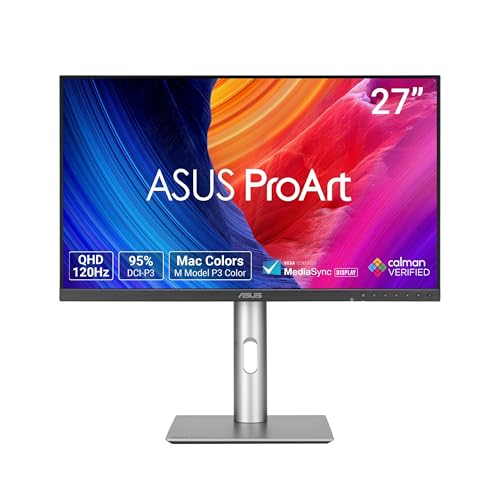
Photographers seeking exceptional color accuracy will find the ASUS ProArt Display 27” Professional Monitor (PA278QGV) an ideal choice. With its 27-inch QHD display and 95% DCI-P3 color gamut, your images will come to life in stunning detail. The Calman Verified Delta E < 2 color accuracy guarantees precision in your edits. Plus, its ergonomic design allows you to tilt, swivel, and adjust height for comfort during long editing sessions. Extensive connectivity options like DisplayPort and HDMI make it easy to set up. Enjoy a complimentary 3-month Adobe Creative Cloud access to elevate your creative projects even further.
Best For: Photographers and visual creators who require exceptional color accuracy and ergonomic design for long editing sessions.
Pros:
- High color accuracy with Calman Verified Delta E < 2 ensures precise edits.
- Ergonomic adjustments allow for comfortable viewing and editing positions.
- Extensive connectivity options including DisplayPort and HDMI facilitate easy setup.
Cons:
- Limited refresh rate may not cater to high-end gaming needs.
- Size may be too large for smaller workspaces.
- Price point may be higher compared to standard monitors without specialized features.
Dell UltraSharp U2725QE 27″ 4K UHS IPS Black Monitor

If you’re seeking a monitor that delivers exceptional color accuracy, the Dell UltraSharp U2725QE stands out with its impressive 99% DCI-P3 and 100% sRGB color coverage. This 27″ 4K Ultra HD display features an IPS Black panel, ensuring stunning clarity and vibrant colors, with a Delta E of less than 1.5 for true-to-life visuals. Enjoy a fluid experience thanks to the 120Hz refresh rate, perfect for gaming and video editing. With versatile connectivity options, including Thunderbolt 4 and USB-C, and full ergonomic adjustability, this monitor caters perfectly to professionals and creatives who demand the best in their work.
Best For: Professionals and creatives who need exceptional color accuracy and high refresh rates for gaming and video editing.
Pros:
- Stunning 27″ 4K Ultra HD resolution with vibrant colors and clarity.
- 120Hz refresh rate ensures fluid, lag-free visuals ideal for fast-paced action.
- Versatile connectivity options, including Thunderbolt 4 and USB-C, along with full ergonomic adjustability.
Cons:
- Higher price point compared to standard monitors.
- Requires compatible hardware to fully utilize the 4K resolution and refresh rate.
- Limited built-in speakers may not meet audio needs for some users.
Factors to Consider When Choosing a Color Accurate Monitor for Photographers
When you’re choosing a color accurate monitor, several factors come into play. You’ll want to take into account color accuracy standards, display resolution, and connectivity options to guarantee the best results. Don’t forget about calibration capabilities and ergonomic design, as these can greatly impact your workflow and comfort.
Color Accuracy Standards
Choosing the right color accurate monitor involves understanding several key standards that directly impact your work. Look for monitors with a Delta E of less than 2, guaranteeing excellent color fidelity essential for professional photography. For web-based projects, a monitor covering 100% of the sRGB color space is essential, while 99% Adobe RGB coverage is critical for print media to achieve vibrant colors. Monitors validated by Pantone or Calman confirm adherence to strict color accuracy standards. Opt for IPS panel technologies, offering wide viewing angles and consistent color representation, which help you assess image quality during editing. Finally, check for factory calibration reports; these guarantee your monitor meets specific color accuracy benchmarks right out of the box, providing you with precise color output.
Display Resolution Importance
Display resolution plays an essential role in achieving the clarity and detail needed for professional photography. Higher resolutions, like 4K (3840 x 2160), provide more pixels, resulting in sharper and more precise images compared to lower resolutions such as Full HD (1920 x 1080). This increased detail is crucial for tasks like retouching and color grading, allowing you to see finer nuances in your work. For professional editing, a monitor with at least QHD (2560 x 1440) resolution is recommended to guarantee adequate clarity. Additionally, higher resolutions enhance color rendering, enabling a broader color gamut and smoother gradient shifts. Choosing a monitor with high resolution can greatly elevate your viewing experience, making it essential for your creative process.
Connectivity Options Available
Having the right connectivity options is essential for photographers who rely on color accurate monitors. Look for monitors that include multiple ports like HDMI, DisplayPort, and USB-C to accommodate various devices and workflows. USB-C ports that support power delivery are ideal since they allow you to charge connected devices while transferring data and video signals. If you often switch between different computers, consider models with KVM switch capabilities, so you can easily control multiple systems with one keyboard and mouse. Additionally, check for daisy-chaining capabilities via DisplayPort to connect multiple monitors without cluttering your workspace. Monitors with built-in USB hubs can further enhance productivity by providing extra ports for your peripherals, simplifying cable management.
Calibration Capabilities
When it comes to achieving true color accuracy, a monitor’s calibration capabilities play an essential role in your photography workflow. Look for monitors with Delta E values under 2, as this indicates professional-grade color accuracy. Factory calibration is a huge plus, offering ready-to-use precision that’s often verified by industry standards like Calman. If you’re serious about color fidelity, consider models that support hardware calibration software, which can guarantee consistency across different displays. Additionally, monitors with wide color gamuts, such as 100% sRGB and 99% Adobe RGB, give you a broader range of colors to enhance your creativity. Remember, regular calibration is key to maintaining accuracy, as environmental changes can affect your display’s performance over time.
Ergonomic Design Features
A well-designed monitor can greatly enhance your editing experience, especially during those long hours spent perfecting your photographs. Look for adjustable stands that let you modify height, tilt, swivel, and pivot to find your ideal viewing angle. VESA mount compatibility is also a plus, allowing you to install your monitor on adjustable arms or wall mounts for ideal positioning. Consider monitors with anti-glare surfaces to reduce eye strain and provide a more comfortable viewing experience. Customizable ergonomic designs can support various working postures, minimizing the risk of repetitive strain injuries. Improved ergonomics not only boost comfort but can also enhance your productivity, enabling you to focus longer and edit with greater ease.
Panel Technology Types
Choosing the right panel technology is key to achieving accurate color representation in your photography edits. IPS (In-Plane Switching) panels are highly recommended for their wide viewing angles and consistent color reproduction, making them ideal for detailed work. While TN (Twisted Nematic) panels offer faster response times, they compromise on color accuracy and viewing angles. On the other hand, VA (Vertical Alignment) panels provide better contrast ratios and deeper blacks but may not match IPS in color fidelity. If you’re willing to invest more, OLED (Organic Light Emitting Diode) technology delivers exceptional color accuracy and contrast, though it can be prone to burn-in. Finally, consider color depth; panels with 10-bit and above can display over a billion colors, enhancing your editing experience.
Eye Care Technologies
For photographers, eye care technologies are essential in selecting a color accurate monitor that won’t lead to discomfort during long editing sessions. Look for monitors with Flicker-Free and Low Blue Light features to effectively reduce eye strain. Anti-glare screens minimize reflections, allowing you to focus on your images while maintaining color accuracy. Many modern monitors carry TUV certification for anti-reflection, ensuring comfort in various lighting conditions. Ergonomic designs with adjustable height, tilt, and swivel options help you find the perfect viewing position, reducing neck and eye fatigue. Finally, choose displays with consistently calibrated Delta E values below 2 to enhance color fidelity, enabling precise adjustments without straining your eyes.