In today’s world, staying connected and secure at home is more important than ever. With the advancements in technology, the camera monitoring hubs of 2025 offer features that can markedly enhance your home security. You’ll find options that cater to various needs, from reliable offline recording to sophisticated facial recognition. Curious about which hubs stand out and how they can improve your home monitoring experience? Let’s explore the top contenders.
REOLINK Home Hub for Security Cameras

The REOLINK Home Hub for Security Cameras is the ideal choice for families looking for a cost-effective and reliable security solution. You can easily manage up to eight REOLINK battery/WiFi cameras and doorbells from one central hub. With secure offline recording, your footage stays safe even during Wi-Fi outages. The included 64GB SD card offers expandable storage up to 1TB, so you won’t face monthly fees. Plus, real-time alerts and motion tracking keep you informed about home activity. With AES-128 encryption, your data remains secure, ensuring privacy and peace of mind for your family.
Best For: Families seeking a cost-effective and reliable security solution for managing multiple REOLINK battery/WiFi cameras and doorbells.
Pros:
- Centralized management for up to 8 REOLINK cameras and doorbells, simplifying home security.
- Secure offline recording ensures footage is safe even during Wi-Fi outages, with no monthly fees.
- Real-time alerts and motion tracking provide immediate notifications and peace of mind.
Cons:
- Compatibility limited to REOLINK battery/WiFi cameras and doorbells only.
- Requires manual setup and management for optimal use, which may be challenging for some users.
- Limited to a maximum of 1TB expandable storage, which may not meet the needs of larger households.
Tapo Smart Home Central Hub for Smart Devices (Tapo H500)

If you’re looking for a powerful solution to manage your smart home security, the Tapo Smart Home Central Hub (Tapo H500) is an excellent choice. It connects and controls up to 16 Tapo cameras and 64 sensors, letting you view live footage on mobile devices or larger screens via HDMI. With built-in 16GB storage and expandable options, you can access recordings without extra subscriptions. Its advanced WPA3 encryption and built-in alarm enhance security, while two-way audio allows communication with visitors. Plus, facial recognition technology reduces unwanted alerts, making your smart home experience seamless and secure.
Best For: Homeowners seeking a comprehensive and user-friendly smart home security solution that integrates multiple devices and enhances safety.
Pros:
- Centralized control of up to 16 cameras and 64 sensors, providing extensive coverage for smart homes.
- No subscription fees required for accessing recordings, thanks to built-in storage and expandable options.
- Advanced security features like WPA3 encryption and facial recognition technology for enhanced privacy and efficiency.
Cons:
- Limited to Tapo devices, which may restrict users who have other brand cameras and sensors.
- Expandable storage requires additional purchase of HDD/SSD, increasing initial setup costs.
- Reliance on WiFi for some features may affect performance in areas with weak internet connectivity.
Aqara 4MP Camera Hub G5 Pro PoE Security Camera

For homeowners seeking advanced security solutions, the Aqara 4MP Camera Hub G5 Pro PoE Security Camera stands out with its impressive 4MP HD resolution and true color night vision capabilities. You’ll appreciate its built-in 3000K dimmable spotlight, enhancing visibility without infrared light. The camera offers local AI detection for faces, vehicles, and even abnormal sounds, ensuring you stay informed. As a hub, it connects up to 80 Zigbee devices, integrating seamlessly with Apple Home, Alexa, and Google Home. Plus, with built-in encrypted storage and easy PoE installation, it’s a secure, user-friendly choice for any smart home.
Best For: Homeowners looking for a comprehensive security solution with advanced detection capabilities and smart home integration.
Pros:
- High-quality 4MP HD resolution with true color night vision for clear visibility.
- Local AI detection and abnormal sound alerts keep you informed of potential issues.
- Acts as a hub for multiple Zigbee devices, enhancing your smart home ecosystem.
Cons:
- Requires PoE installation, which may necessitate additional equipment like a PoE switch.
- Limited support for third-party USB dongles, potentially restricting functionality.
- HomeKit Secure Video requires an active iCloud subscription and an Apple Home hub for full features.
eufy Smart Display E10, Smart Home Hub

With its intuitive 8-inch touchscreen and hands-free alerts, the eufy Smart Display E10 is perfect for families seeking a seamless smart home experience. You’ll receive instant notifications when your doorbell rings, doors open, or motion is detected, with live feeds lighting up for immediate access. Enjoy the convenience of monitoring up to four simultaneous live streams, letting you keep an eye on multiple areas at once. Plus, historical events download automatically, allowing for easy playback of key security moments. Its user-friendly design makes it accessible for everyone, from kids to seniors, ensuring peace of mind for your loved ones.
Best For: Families looking for a user-friendly smart home hub that offers seamless monitoring and instant alerts.
Pros:
- Hands-free alerts provide immediate notifications for doorbell rings, door unlocks, and motion detection, enhancing security.
- Live monitoring capabilities allow for up to four simultaneous video feeds, enabling comprehensive surveillance of multiple areas.
- User-friendly design with an 8-inch touchscreen makes it accessible for all ages, ensuring ease of use for everyone in the family.
Cons:
- Limited compatibility with some smart home devices may restrict functionality for users with diverse ecosystems.
- Dependence on Wi-Fi means that a weak internet connection can affect performance and reliability of live feeds.
- Size constraints of the 8-inch display may not suit those who prefer larger screens for monitoring or viewing content.
Aqara 4MP Camera Hub G5 Pro WiFi Security Camera

The Aqara 4MP Camera Hub G5 Pro WiFi Security Camera stands out as an ideal choice for homeowners seeking advanced security features without compromising on quality. With its impressive 4MP HD resolution and 133° field of view, you’ll capture every detail. The true color night vision and built-in dimmable spotlight guarantee clarity even in darkness. Local AI detection helps identify faces, vehicles, and even unusual sounds, keeping you informed. As a hub, it connects up to 80 Zigbee devices, guaranteeing seamless integration. Plus, with secure storage options and dual-band Wi-Fi, it offers both flexibility and peace of mind for your home security.
Best For: Homeowners looking for a comprehensive security solution with advanced detection features and seamless smart home integration.
Pros:
- High-quality 4MP HD resolution and 133° field of view for detailed surveillance.
- Local AI detection capabilities for faces, vehicles, and unusual sounds enhance security.
- Acts as a hub for up to 80 Zigbee devices, allowing for extensive smart home integration.
Cons:
- Requires a continuous power source; not battery-operated.
- 24/7 recording is only supported with RTSP stored on local devices, limiting cloud storage options.
- Compatibility with third-party devices may require additional setup and isn’t officially supported.
Aqara 2K Security Indoor Camera Hub G3

Aqara’s 2K Security Indoor Camera Hub G3 stands out for its innovative AI facial, pet, and gesture recognition features, making it the ideal choice for tech-savvy homeowners who want to enhance their smart home security. With a 2K resolution and a 360° viewing angle, you’ll enjoy clear images and extensive coverage. It connects seamlessly with up to 128 Aqara Zigbee devices and supports 2.4/5 GHz Wi-Fi, ensuring reliable integration with your smart ecosystem. Plus, its privacy features, like hardware mode and data encryption, give you peace of mind. Elevate your home security effortlessly with this user-friendly hub.
Best For: Tech-savvy homeowners looking to enhance their smart home security with advanced features and seamless integration.
Pros:
- Innovative AI facial, pet, and gesture recognition for enhanced interaction and security.
- High-resolution 2K imaging and 360° viewing angle provide clear images and extensive coverage.
- Seamless integration with up to 128 Aqara Zigbee devices and compatibility with various smart home platforms.
Cons:
- Limited functionality with third-party USB dongles and Zigbee2MQTT is not officially supported.
- HomeKit Secure Video mode records at Full HD 1080p due to limitations despite the 2K sensor.
- Some users may find the reliance on smart home ecosystems limiting if they prefer standalone devices.
Arlo Pro SmartHub – Connects Cameras to Wi-Fi

For homeowners seeking a reliable way to connect their security cameras, the Arlo Pro SmartHub stands out as an exceptional choice. This certified accessory works seamlessly with various Arlo cameras, including the Essential and Ultra series. Its long-range Wi-Fi connectivity guarantees your cameras stay linked, enhancing battery life and performance. Setting it up is a breeze, as the SmartHub automatically switches to the strongest band if you’re using a dual-band router. Plus, the local backup feature allows you to connect a USB for video storage. With a solid customer rating and compact design, it’s perfect for keeping your home secure.
Best For: Homeowners looking for a reliable and efficient way to connect and manage their Arlo security cameras.
Pros:
- Easy setup with automatic band switching for optimal connectivity.
- Long-range Wi-Fi connectivity enhances camera battery life and performance.
- Local backup support via USB for secure video storage.
Cons:
- Limited to Arlo cameras and may not support other brands.
- Requires a corded electric power source, limiting placement options.
- Some users may find the initial setup process confusing if unfamiliar with technology.
REOLINK Home Hub Pro for Security Cameras

If you’re looking for a robust and centralized solution to manage your home security, the REOLINK Home Hub Pro stands out as an excellent choice. It manages up to 24 cameras, with 12 wired connections, via a user-friendly app. Enjoy pre-installed 2TB storage, expandable to 16TB, ensuring you won’t miss any vital footage. With built-in AES-128 encryption, your recordings remain private and secure. The hub provides detailed monitoring reports and features a powerful 120dB siren for alerts. Plus, Wi-Fi 6 connectivity guarantees smooth streaming and control. Best of all, there are no monthly fees, making it a cost-effective option.
Best For: Those seeking a comprehensive and user-friendly home security solution with extensive camera management capabilities and no recurring fees.
Pros:
- Supports up to 24 cameras, providing extensive coverage for home security.
- Pre-installed 2TB storage, expandable to 16TB, ensuring ample space for video footage.
- Wi-Fi 6 connectivity enhances streaming quality and reduces lag.
Cons:
- Limited to 12 wired connections, which may restrict setup options for larger installations.
- MicroSD card cannot save videos when both HDD and microSD are in use, potentially limiting backup options.
- Excludes 4G device support, which may be a drawback for users needing cellular connectivity.
Aqara Security Camera Hub Indoor G2H Pro
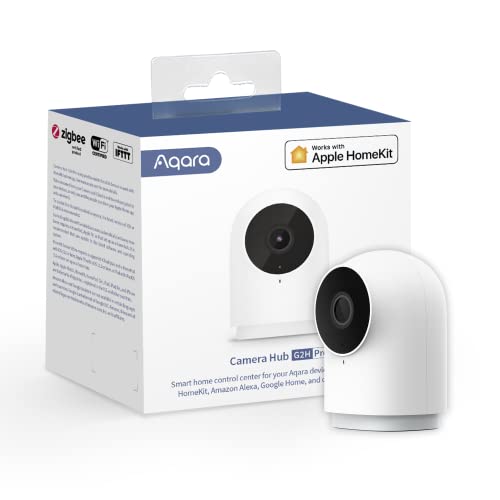
The Aqara Security Camera Hub Indoor G2H Pro stands out as an ideal choice for tech-savvy homeowners seeking seamless integration with smart home systems. You’ll appreciate its 1080p Full HD recording, 146° wide-angle lens, and night vision capability. With two-way audio, you can communicate in real-time, while notifications alert you of any unusual activity. It connects effortlessly to Apple HomeKit and supports Alexa and Google Assistant. For storage, you can use iCloud or a micro SD card. Plus, with advanced privacy features and encrypted streams, you can guarantee your home security is both effective and secure.
Best For: Tech-savvy homeowners looking for a versatile security camera that integrates seamlessly with smart home systems.
Pros:
- 1080p Full HD recording and a 146° wide-angle lens for comprehensive monitoring.
- Two-way audio feature allows for real-time communication with visitors or pets.
- Supports multiple smart home platforms including Apple HomeKit, Alexa, and Google Assistant.
Cons:
- Power adapter not included, which may require an additional purchase.
- Only supports 2.4 GHz Wi-Fi, limiting connectivity options for some users.
- Micro SD card not included, requiring extra investment for local storage.
Arlo Pro SmartHub Certified Accessory for Cameras
Arlo Pro SmartHub is an ideal choice for anyone looking to seamlessly connect multiple cameras to their home Wi-Fi network. It’s compatible with a range of Arlo devices, including the Ultra 2, Pro 4, and even video doorbells. This hub guarantees long-range connectivity with support for Wi-Fi 2.4 GHz, Zigbee, and more. You can easily connect a Micro SD drive for local video backup, adding an extra layer of security. Plus, it features a smart siren and can expand coverage through additional base stations. The package includes everything you need to get started right away. Stay secure!
Best For: Homeowners looking to enhance their security system with reliable connectivity and backup options for multiple Arlo cameras.
Pros:
- Long-range connectivity allows for reliable connections even in larger homes.
- Local backup feature enables secure storage of video footage via a Micro SD drive.
- Smart siren provides an additional layer of security and deterrence against intruders.
Cons:
- May require a learning curve for users unfamiliar with smart home technology.
- Limited to compatibility with specific Arlo devices, which may not suit all users.
- Additional base stations for expanded coverage may incur extra costs.
Factors to Consider When Choosing a Camera Monitoring Hub
When choosing a camera monitoring hub, you need to contemplate several key factors. Think about compatibility with your existing devices, storage capacity options, and the security features offered. Also, evaluate the connectivity and integration capabilities, along with how user-friendly the interface is.
Compatibility With Devices
Choosing the right camera monitoring hub hinges on compatibility with your existing devices. First, confirm the hub works with the specific brands and models of security cameras and doorbells you plan to use, as some hubs only support select devices. Next, check how many devices the hub can connect to; some manage multiple cameras and sensors while others have limited capacity. It’s also crucial to evaluate whether the hub supports both wired and wireless cameras for flexible installation. Look for hubs that integrate with smart home ecosystems to work seamlessly with devices like smart speakers. Finally, verify if the hub supports advanced features like facial recognition or AI detection, which may depend on specific camera compatibility for peak performance.
Storage Capacity Options
Compatibility with your devices sets the stage for evaluating storage capacity options in a camera monitoring hub. When choosing a hub, consider built-in storage, which can range from 16GB to several terabytes. This affects how much video footage you can save. Look for hubs that offer expandable storage options, like additional HDD or microSD card slots, so you can increase capacity as needed. Offline storage capabilities are essential too; they guarantee recordings are saved directly to the hub during network outages, giving you continuous access. Verify if the hub supports local backup options, such as USB drives, for added security. Finally, be aware of potential limitations on simultaneous recording, as some hubs may restrict the number of cameras recording at once.
Security Features Offered
Security features are crucial considerations for anyone selecting a camera monitoring hub, as they directly impact the effectiveness of your surveillance system. Look for hubs that offer AES-128 encryption to guarantee your data remains secure during storage and transmission. Built-in alarms or sirens can deter intruders and provide immediate notifications if suspicious activity occurs. It’s also important to choose a hub with offline recording capabilities, guaranteeing continuous surveillance even during internet outages. Advanced features like facial recognition technology can filter known faces and reduce unnecessary alerts. Finally, evaluate the ability to set configurable activity zones, which helps minimize false alerts by focusing on specific areas of interest within the camera’s field of view.
Connectivity and Integration
When setting up a camera monitoring hub, connectivity and integration play a key role in how well your surveillance system functions within your smart home. Look for hubs that support multiple protocols like Wi-Fi, Zigbee, and Z-Wave to guarantee compatibility with various devices. Consider the number of devices the hub can connect to; some support more, enhancing integration across your ecosystem. Evaluate whether the hub operates in both wired and wireless configurations for flexibility and reliability. Don’t forget to check for local storage capabilities and backup options, which are vital for accessing recorded footage without relying solely on the cloud. Finally, confirm the hub supports advanced security protocols like WPA3 encryption to keep your camera feeds safe from unauthorized access.
User Interface Usability
A user-friendly interface is crucial for effective camera monitoring, making it easier for you to navigate and access important features. Look for touchscreen displays or mobile app compatibility that allow for intuitive interactions, enabling real-time monitoring wherever you are. Customizable dashboards can give you quick overviews of critical information, which is especially helpful when managing multiple camera feeds and alerts. Additionally, clear notifications and alerts should be prominently displayed to keep you informed of any security events or system statuses. Finally, having help guides or FAQs integrated into the interface can assist you in troubleshooting issues independently, enhancing your overall experience. Choose a hub that prioritizes usability to guarantee your monitoring process is seamless and efficient.