As you explore the evolving world of multi-camera control systems, you’ll discover that 2025 brings innovative solutions for seamless video production. From portable livestreaming systems to versatile video mixers, the options are expanding. Each device offers unique features that cater to both seasoned professionals and aspiring creators. Curious about which systems stand out and what factors you should consider? Let’s take a closer look at the top contenders for your next production.
Roland AeroCaster Portable Livestreaming System

The Roland AeroCaster Portable Livestreaming System is perfect for creators looking to elevate their livestreaming game with seamless multi-camera control. This powerful system connects wirelessly to up to four iOS and Android devices, allowing you to switch between cameras effortlessly. With its intuitive iPad app, you can stream directly to platforms like YouTube and Twitch in minutes. Save and recall up to 30 customized scenes, complete with graphics and viewer comments. Plus, the professional audio management features guarantee your sound is crystal clear. Whether you’re streaming from home or on the go, the AeroCaster has you covered.
Best For: Creators and livestreamers seeking a versatile and portable solution for multi-camera streaming with professional audio management.
Pros:
- Wireless Connectivity: Easily connect and switch between up to four smartphones and tablets for a dynamic livestreaming experience.
- User-Friendly App: The intuitive iPad app allows for quick setup and streaming to popular platforms like YouTube and Twitch.
- Scene Management: Save and customize up to 30 scenes, enhancing the production value with graphics and live viewer interaction.
Cons:
- Device Compatibility: Requires iPad with iPadOS 14.6 or later, which may limit use for some users with older devices.
- Dependence on Wi-Fi/Cellular: Streaming quality can be affected by network stability and speed, posing challenges in certain environments.
- Limited Physical Inputs: The hardware controller may not support extensive audio sources beyond the provided XLR and stereo inputs.
Osee GoStream Deck HDMI Pro Live Streaming Video Mixer Switcher

Designed for content creators and live streamers, the Osee GoStream Deck HDMI Pro Live Streaming Video Mixer Switcher stands out with its ability to simultaneously stream to three platforms, including YouTube and Facebook. With four HDMI inputs and two outputs, you can connect multiple media sources effortlessly. Its audio control features include professional effects and adjustable knobs for precise sound management. The built-in menu system allows easy operation without a PC, while auto-switching guarantees seamless changes. Plus, you can enhance your streams with graphics overlays and keyers. For any questions, professional multilingual customer service is ready to assist you.
Best For: The Osee GoStream Deck HDMI Pro Live Streaming Video Mixer Switcher is best for content creators and live streamers looking for a versatile, high-quality streaming solution.
Pros:
- Simultaneous streaming to three platforms allows for broader audience reach.
- Professional audio control features enhance sound quality during live productions.
- Built-in menu system enables easy operation without needing a PC, streamlining workflow.
Cons:
- May have a learning curve for users unfamiliar with live streaming technology.
- Limited to four HDMI inputs, which may not be sufficient for larger productions.
- Price point may be higher than some entry-level alternatives, potentially deterring budget-conscious buyers.
FEELWORLD LIVEPRO L1 V1 Multi Camera Video Mixer Switcher

For solo video producers seeking an efficient solution, the FEELWORLD LIVEPRO L1 V1 Multi Camera Video Mixer Switcher stands out with its user-friendly compact design and lightweight build. With four HDMI inputs supporting 1080p, you can easily switch between high-quality video sources in real time. The 2-inch LCD display enhances monitoring, while USB 3.0 output allows seamless streaming to social media. You’ll appreciate the rich special effects and convenient options to preview or set inputs. Plus, remote operation via LAN means no extra software is needed, making it perfect for dynamic video productions.
Best For: Solo video producers looking for a compact and efficient multi-camera switching solution for live streaming and real-time production.
Pros:
- User-friendly design makes it easy for single-person operation.
- Supports 4 HDMI inputs with 1080p quality, enhancing live streaming image quality.
- Remote operation through LAN allows for flexibility without needing extra software.
Cons:
- Limited to 4 HDMI inputs, which may not be sufficient for larger productions.
- The 2-inch LCD display may be small for detailed monitoring during complex setups.
- May require additional accessories for optimal use in specific production environments.
PTZ Camera Controller with LCD Screen for Live Streaming (TEM-JOY1)

Offering a seamless experience for live streaming, the Prisual PTZ Camera Controller (TEM-JOY1) stands out as an ideal choice for professionals in fields like education, esports, and event management. With its 4D joystick and intuitive LCD screen, you can easily control up to 256 PTZ cameras, managing pan, tilt, zoom, focus, and more. The built-in NDI and PoE simplify setup and reduce cable clutter. Plus, the two control modes and compatibility with major brands guarantee you’ll have the flexibility needed for any production. Rated 4.6 stars, this controller delivers reliable performance for all your multi-camera needs.
Best For: Professionals in education, esports, and event management looking for a versatile and user-friendly camera control solution.
Pros:
- Intuitive Control: Features a 4D joystick and LCD screen for easy operation of multiple PTZ cameras.
- Flexible Connectivity: Supports various protocols and Power over Ethernet (PoE) for simplified installation.
- High Compatibility: Works with major camera brands and Prisual Auto Tracking cameras, ensuring versatility in setups.
Cons:
- Weight: At 3.3 pounds, it may be less portable for some users compared to lighter alternatives.
- Limited Quick Select Options: Only allows for quick access to 6 cameras at a time, which may be restrictive in larger setups.
- Firmware Dependency: Requires specific firmware versions (v5.4.3 or later) for compatibility with major camera brands, which could necessitate updates.
FEELWORLD L2 Plus Multi Camera Video Mixer Switcher
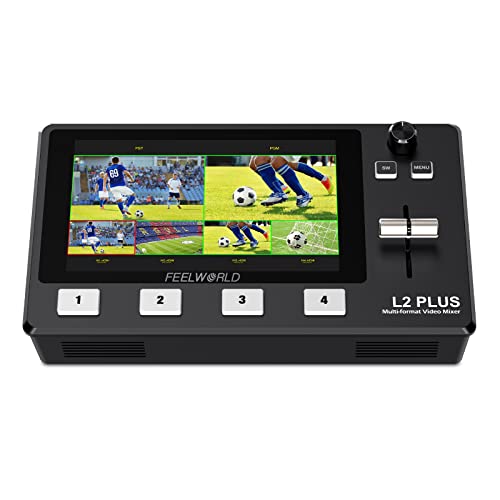
The FEELWORLD L2 Plus Multi Camera Video Mixer Switcher is an ideal choice for live streamers and video producers who demand flexibility and efficiency in their setups. With its 5.5-inch LCD touchscreen, you can easily monitor four HDMI inputs, PGM output, and even control up to eight PTZ cameras using the VISCA protocol. Real-time production and live streaming become effortless, thanks to its USB 3.0 output and integrated webcam functionality. Plus, you can enhance your streams with Chroma Key effects and logo overlays. Control it remotely via the XPOSE software or Feelworld Live app for ultimate convenience.
Best For: Live streamers and video producers seeking a versatile and efficient video switching solution.
Pros:
- User-friendly 5.5-inch LCD touchscreen for easy monitoring and control of multiple video sources.
- Supports real-time production and live streaming with USB 3.0 output and webcam functionality.
- Advanced features like Chroma Key and logo overlays enhance the professionalism of your video content.
Cons:
- Limited to 4 HDMI inputs, which may not be sufficient for larger productions.
- Requires a stable Wi-Fi connection for smartphone control, which may not always be available.
- Potential learning curve for users unfamiliar with video mixing technology and software.
FoMaKo KC608 Pro NDI PTZ Camera Controller
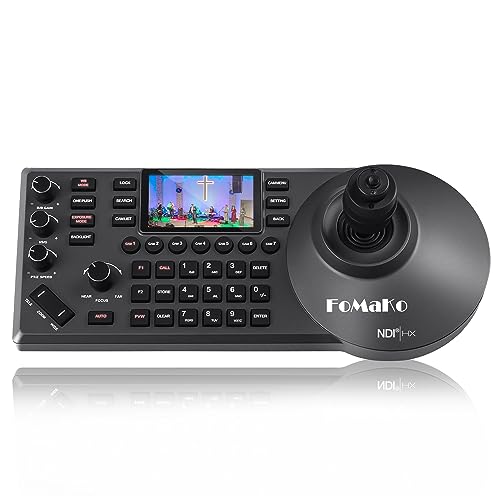
Designed with versatility in mind, the FoMaKo KC608 Pro NDI PTZ Camera Controller is perfect for professionals who demand seamless control over multiple cameras during live productions. With its PoE power, built-in LCD preview, and ergonomic design, you’ll enjoy an intuitive experience. The 4D precision joystick allows you to control up to 255 PTZ cameras effortlessly, while multi-camera streaming capabilities enhance your workflow. It supports various protocols and integrates smoothly with popular software like vMix and OBS. Plus, you’ll benefit from 24/7 expert assistance and a 3-year warranty, making this controller a reliable choice for any production setting.
Best For: Professionals in live production environments, including event coordinators, educators, and esports organizers, who require efficient control over multiple PTZ cameras.
Pros:
- Versatile compatibility with various protocols (VISCA, PELCO-P & D) and seamless integration with popular streaming software like vMix and OBS.
- User-friendly design featuring a high-quality silicone keyboard and ergonomic wrist rest for comfortable operation during long sessions.
- Comprehensive support with a 3-year warranty, 30-day money-back guarantee, and lifetime customer technical support.
Cons:
- Limited to FoMaKo cameras for quick select function, which may restrict flexibility with other brands.
- Potential learning curve for users unfamiliar with camera control protocols and multi-camera setups.
- Higher price point compared to basic camera controllers, which might not be suitable for budget-conscious users.
Video Quad Color 4CH Multiplexer with Remote Control

For those working with analog cameras, the Video Quad Color 4CH Multiplexer with Remote Control stands out as an essential tool in video production. This multiplexer supports four-channel BNC input, enabling seamless integration of multiple cameras. With real-time refresh rates, you’ll enjoy a full quad display. The remote control adds convenience, allowing you to manage settings easily. Features like video lost detection and motion detection enhance your workflow. Plus, the picture-in-picture function helps you monitor different angles simultaneously. Don’t forget, it comes with a free 1A power adapter and a CR2025 button battery for added value.
Best For: This product is best for video production professionals and hobbyists using analog cameras who need an efficient way to monitor multiple feeds simultaneously.
Pros:
- Supports four-channel BNC input for seamless integration of multiple analog cameras.
- Real-time refresh rates provide a clear and responsive full quad display.
- Includes remote control for convenient management of settings and features.
Cons:
- Limited to analog cameras only, not compatible with digital or IP cameras.
- No advanced features like network connectivity or cloud storage options.
- Requires a power adapter and battery, which may add extra items to manage.
RGBlink mini-Edge SDI Pro Live Streaming Video Mixer Switcher

Looking for an efficient solution to manage multiple cameras in your live production? The RGBlink mini-Edge SDI Pro Live Streaming Video Mixer Switcher is your go-to choice. With 4K HDMI/SDI inputs, a 5.5″ screen, and integrated PTZ control, it streamlines your workflow. You can easily connect DSLRs or broadcast equipment, plus enjoy dual 2K HDMI outputs for seamless streaming to platforms like Zoom or YouTube. Its remote management features and real-time audio mixing capabilities make it perfect for concerts, eSports, or corporate events, ensuring your production runs smoothly from anywhere. Elevate your live streaming experience today!
Best For: The RGBlink mini-Edge SDI Pro Live Streaming Video Mixer Switcher is best for professionals and teams involved in live production, such as event organizers, broadcasters, and content creators who require a versatile and efficient multi-camera mixing solution.
Pros:
- Offers multiple input options including 4K HDMI and SDI for diverse equipment compatibility.
- Integrated PTZ control and remote management features enhance operational efficiency during live events.
- Real-time audio mixing allows for seamless integration of multiple audio sources, perfect for dynamic live productions.
Cons:
- The learning curve may be steep for users unfamiliar with multi-camera production setups.
- Limited portability due to its size and design, making it less ideal for on-the-go productions.
- Higher price point compared to basic streaming solutions, which may not be suitable for all budgets.
AVKANS Pro PTZ Camera Joystick Controller with 5-inch Touch Screen

The AVKANS Pro PTZ Camera Joystick Controller stands out with its intuitive 5-inch touch screen, making it an ideal choice for churches and video production teams that need seamless control over multiple cameras. You can easily manage camera movements like auto focus and zoom, while adjusting pan and tilt speeds. It supports various protocols, ensuring compatibility with most PTZ camera brands. With six customizable keys, you can tailor settings to your needs. Plus, the controller simplifies setup and allows HD video previews. Don’t forget, it comes with a free NDI license for testing, making it even more appealing.
Best For: The AVKANS Pro PTZ Camera Joystick Controller is best for churches, live streaming professionals, and video production teams needing efficient multi-camera control.
Pros:
- Intuitive 5-inch touch screen simplifies setup and operation.
- Support for multiple protocols ensures compatibility with a wide range of PTZ camera brands.
- Customizable keys allow for personalized settings, enhancing user experience.
Cons:
- NDI functionality requires a purchased license after the initial testing period.
- Varied RTSP URL formats among different brands may complicate live video previews.
- Limited to 100 camera shortcuts, which may not suffice for larger setups.
Feelworld L2 Plus 5.5″ LCD Multi-Camera Video Mixer Switcher for Live Streaming

Designed specifically for live streaming enthusiasts and professionals, the Feelworld L2 Plus 5.5″ LCD multi-camera video mixer switcher stands out with its ability to preview four camera feeds simultaneously. Its 5.5-inch touch screen makes monitoring effortless, displaying input sources, PST preview, and PGM output all in one place. You’ll love the PTZ camera control for VISCA protocol cameras, allowing you to manage movement, zoom, and focus directly. With advanced Chroma Key and LOGO overlay features, your broadcasts will look professional. Plus, the USB 3.0 connection lets you stream live on platforms like YouTube and Facebook, ensuring seamless integration.
Best For: Live streaming enthusiasts and professionals seeking a compact and efficient video mixing solution.
Pros:
- Real-time preview of 4 camera feeds allows for seamless switching and monitoring during live broadcasts.
- PTZ camera control enables detailed management of camera movements, enhancing the quality of live streams.
- Built-in advanced Chroma Key and LOGO overlay features provide professional-grade visuals for an engaging viewing experience.
Cons:
- The PTZ functionality requires the device to remain in the Control interface, which may limit multitasking.
- The 5.5-inch screen might be small for some users, especially during complex live productions.
- Limited to only VISCA protocol cameras for PTZ control, which may restrict compatibility with other camera brands.
Factors to Consider When Choosing a Multi Camera Control System
When you’re choosing a multi-camera control system, you’ll want to take into account several key factors. Think about the connectivity options, ease of the control interface, and how well it manages audio. Additionally, verify the system supports the video quality you need and is compatible with your preferred streaming platforms.
Connectivity Options Available
Choosing the right multi-camera control system hinges on understanding the connectivity options available. You’ll find various connections like HDMI, SDI, and USB, which let you seamlessly link multiple video and audio sources. Many systems support Ethernet for real-time streaming and control, making it easier to integrate networked devices and manage them remotely. Power over Ethernet (PoE) simplifies installation by allowing both power and data transfer through a single cable, reducing clutter. Make certain your system is compatible with protocols like VISCA, Pelco-D/P, and NDI to control different camera brands effectively. Some options even include Type-C ports, providing direct connections to cameras or storage devices, enhancing versatility for any production environment you might encounter.
Control Interface Ease
A user-friendly control interface is essential for effectively managing a multi-camera system, especially if you want to streamline operations. With an intuitive design, you can operate your system without extensive training or prior experience. Touchscreen controls enhance usability, providing visual feedback and simplifying navigation through menus and settings. If you prefer a tactile approach, physical control panels with dedicated buttons and knobs allow for quick adjustments during live broadcasts, improving efficiency. Additionally, make certain your control system is compatible with various protocols like VISCA and Pelco to seamlessly integrate with multiple camera brands. Finally, the ability to customize layouts and assign user-defined keys greatly enhances your efficiency in operating complex multi-camera setups.
Audio Management Features
Audio management features play an essential role in delivering professional-quality sound during live productions. You’ll want a multi-camera control system that offers multiple audio input options, like XLR, 3.5 mm stereo, and USB, to accommodate various microphones and devices. Look for advanced audio control functionalities, such as EQ, Limiter, and Fader, that let you fine-tune audio levels in real-time for the best sound. Some systems also have audio mixing capabilities, allowing you to combine multiple inputs seamlessly for a cohesive audio experience. Integrated monitoring outputs, like headphone jacks, provide real-time audio feedback, so you can catch and address any issues instantly during your broadcast. Prioritizing these features guarantees your audio remains clear and balanced.
Video Quality Support
When selecting a multi-camera control system, confirming it supports high-definition video quality is essential for delivering a professional viewing experience. Aim for systems that offer at least 1080p resolution, but 4K capabilities are becoming the norm in professional streaming. Evaluate the output options too—make sure the system can deliver video through HDMI, SDI, or USB connections to guarantee compatibility with various devices. Don’t forget to take into account how well the system handles multiple video sources simultaneously; this can greatly impact overall video quality during live productions. Finally, check for advanced features like Chroma Keying, which can enhance video quality by enabling professional overlays and seamless background changes in your streams.
Streaming Platform Compatibility
How can you guarantee your multi-camera control system meets the needs of modern streaming? First, verify it supports popular platforms like YouTube, Facebook Live, and Twitch to reach a wider audience. Check for compatibility with streaming protocols such as RTMP, RTMPS, and NDI, which enable smooth integration with various broadcasting setups. USB output capabilities are essential too; they allow direct connections to streaming software like OBS or vMix, enhancing your production flexibility. Look for systems that enable simultaneous streaming to multiple platforms, maximizing viewership and engagement. Finally, confirm that the system is compatible with necessary operating systems and software versions to avoid connectivity issues during your live events.
User-Friendliness and Portability
What makes a multi-camera control system user-friendly and portable? First, look for intuitive controls like touchscreens or joystick interfaces that let you operate quickly during live events. A lightweight and compact design is essential, making transport and setup a breeze in various locations. Wireless connectivity enhances user-friendliness by cutting down on cable clutter and enabling fast connections to your devices. Features like real-time video monitoring and simple scene management streamline your experience, simplifying live production. Ergonomic design elements, such as wrist rests and easy-to-reach buttons, boost comfort during long streaming sessions. By prioritizing these factors, you’ll guarantee your multi-camera control system meets your needs and enhances your video production experience.