If you’re looking to elevate your studio filming experience, choosing the right camera control console can make all the difference. With numerous options available, it’s essential to find a console that seamlessly integrates with your preferred software while enhancing your workflow. From customizable controls to studio-quality sound, these tools can transform your production process. Let’s explore the top choices that can help you achieve professional results in your content creation.
Elgato Stream Deck + Production Console for Content Creators

The Elgato Stream Deck + is an ideal choice for content creators who need seamless control over their audio and video production. This versatile console combines an audio mixer, studio controller, and production tool, compatible with both Mac and PC. With customizable touch strip dials and LCD keys, you can manage audio, lighting, and video effortlessly. The tactile controls provide instant feedback, ensuring you confirm actions quickly. Plus, the Stream Deck App makes setup a breeze with drag-and-drop customization. With powerful plugins for popular apps like OBS and Twitch, you can enhance your workflow and elevate your content creation experience.
Best For: Content creators, streamers, and gamers who require a versatile tool for managing audio, video, and lighting with ease.
Pros:
- Fully customizable interface allows for tailored workflows and preferences.
- Instant tactile feedback from LCD keys and touch strip enhances user experience.
- Supports a wide range of applications with powerful plugins, improving productivity.
Cons:
- May have a learning curve for new users unfamiliar with production consoles.
- Limited portability due to its desktop design.
- Some advanced features may require additional setup or configuration with third-party software.
TourBox NEO Customizable Editing Controller for Mac/PC

For photographers and videographers seeking precision and efficiency, the TourBox NEO Customizable Editing Controller stands out as an essential tool. This wired controller offers stable, zero-latency performance, compatible with macOS and Windows. It enhances your creative process in programs like Photoshop, Lightroom, and Premiere Pro, simplifying tasks for both novices and pros. The unique button layout and intuitive knobs allow you to manage brush parameters, color grading, and timelines with ease. Designed from feedback by over 1,000 editors, the TourBox NEO transforms your editing experience, making it more streamlined and enjoyable. Elevate your content creation today!
Best For: Photographers and videographers looking for a precise and efficient editing tool to enhance their workflow.
Pros:
- Customizable controls allow users to tailor the editing experience to their specific needs.
- Wired connection ensures stable, zero-latency performance without worrying about battery life.
- Compatible with major creative software, making it versatile for various editing tasks.
Cons:
- Not compatible with Linux or mobile devices, limiting its use for some users.
- Requires time to learn the unique button layout and features for maximum efficiency.
- Fixed wired design may restrict movement compared to wireless alternatives.
Elgato Stream Deck + Studio Controller for Post Production
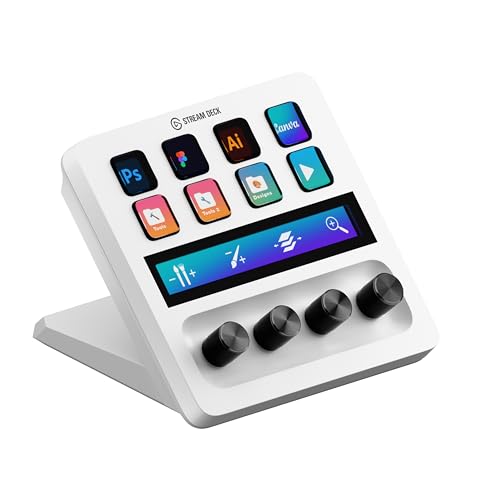
Designed specifically for video editors, the Elgato Stream Deck + Studio Controller revolutionizes post-production with its intuitive layout of 8 LCD keys and 4 adjustable dials. You’ll enjoy launching shortcuts effortlessly and scrubbing through timelines with precision. The touch strip enhances your navigation across tool panels and workspace pages, making editing smoother than ever. This controller is compatible with popular software like Adobe Premiere Pro, After Effects, and DaVinci Resolve, fitting seamlessly into your creative workflow. Whether you’re editing, retouching, or color grading, its studio-ready functionality boosts your efficiency and elevates your production quality.
Best For: Video editors, designers, and music producers looking to enhance their post-production workflow.
Pros:
- Streamlined workflow automation helps to boost efficiency and productivity.
- Intuitive design with LCD keys and dials allows for easy access to shortcuts and controls.
- Compatible with various popular software, making it versatile for different creative tasks.
Cons:
- Learning curve may be present for new users unfamiliar with the interface.
- Limited functionality for users outside the video editing and design fields.
- Price point may be higher than basic controllers, which could deter budget-conscious buyers.
KONOVA vMix Switcher Control Console for Live Broadcast
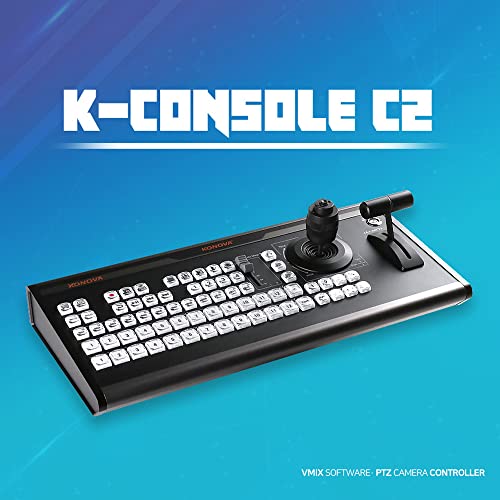
Looking to elevate your live broadcasts? The KONOVA vMix Switcher Control Console is your go-to solution for professional streaming and 4K virtual studio video recording. Compatible with all vMix versions, it features a joystick for precise control of PTZ cameras and a T-bar for seamless video switching. With 69 LED backlight buttons, you can easily manage various functions, including real-time audio adjustments with the built-in mixer. Its multiple connectivity options—V-COM, USB, COM, PTZ, and Tally—allow for flexible setup. Plus, purchasing this console comes with complimentary vMix license keys, enhancing your production experience even further.
Best For: The KONOVA vMix Switcher Control Console is best for professional live streamers and video producers looking for advanced control and functionality in their broadcasts.
Pros:
- User-friendly design: Intuitive layout with 69 LED backlight buttons for easy access to various functions.
- Versatile connectivity: Multiple connection options including V-COM, USB, COM, PTZ, and Tally for flexible setup.
- Complimentary licensing: Purchase includes vMix license keys, providing added value to your production toolkit.
Cons:
- Price point: May be considered expensive for hobbyists or casual users.
- Learning curve: New users may require time to familiarize themselves with all features and controls.
- Limited to vMix compatibility: Exclusively designed for vMix software, restricting use with other broadcasting platforms.
MAONO Podcast Equipment Bundle with Audio Interface and XLR Condenser Microphone

The MAONO Podcast Equipment Bundle is perfect for aspiring podcasters and content creators who want to elevate their audio quality without breaking the bank. This bundle includes a high-quality XLR condenser microphone and an audio interface, making it great for podcasting, streaming, and voice-over work. With plug-and-play functionality, you’ll enjoy crystal-clear recordings. Customize your sound with 11 sound pads and 6 reverb modes, plus a built-in DENOISE function for clarity. It’s compatible with various microphones and connects easily to your devices. The package even comes with everything you need, so set up your professional home studio in no time!
Best For: Aspiring podcasters and content creators looking to enhance their audio quality affordably and efficiently.
Pros:
- Plug-and-play functionality allows for quick and easy setup, making it user-friendly for beginners.
- Customizable audio features with sound pads, reverb modes, and a DENOISE function enhance the overall podcasting experience.
- Versatile compatibility with various microphones and devices ensures flexibility in your setup.
Cons:
- Does not support USB microphones, limiting options for users who own USB-only models.
- Requires additional instructions for optimal setup, which may be challenging for some users unfamiliar with audio equipment.
- Potential learning curve for fully utilizing advanced features like sidechain and auto-tune for beginners.
Elgato Stream Deck + XLR Audio Mixer & Controller

For podcasters, streamers, and content creators seeking an all-in-one solution, the Elgato Stream Deck + XLR Audio Mixer & Controller stands out with its seamless integration of audio mixing and control capabilities. You can easily plug in XLR microphones for studio-quality sound, benefiting from 75 dB gain and 48 V Phantom Power. The customizable LCD keys, touch strip, and dials give you tactile control over audio, video, and lighting. Plus, it supports powerful plugins like OBS and Twitch, enhancing your workflow. With regular updates and a vibrant community, you’re set for a smooth content creation experience.
Best For: Podcasters, streamers, and content creators looking for an integrated audio mixing and control solution.
Pros:
- Offers studio-quality sound with 75 dB gain and 48 V Phantom Power for versatile microphone compatibility.
- Customizable LCD keys, touch strip, and dials provide intuitive control over various media elements.
- Supports a wide range of plugins and regular updates, enhancing functionality and user experience.
Cons:
- May have a learning curve for users unfamiliar with audio mixing and control interfaces.
- Price point may be higher compared to basic audio mixers without advanced features.
- Limited to XLR microphones, which may require additional investment if users only have USB mics.
TOUR BOX Elite Bluetooth Video Editing Controller

Designed specifically for video editors and photographers, the TourBox Elite Bluetooth Video Editing Controller elevates your creative process with its intuitive layout and customizable features. This powerful device connects via Bluetooth or USB-C, ensuring compatibility with macOS and Windows, while supporting major creative software like Premiere, Photoshop, and DaVinci Resolve. You can easily customize knobs, buttons, and key combinations to fit your unique workflow. With tactile feedback and a dedicated color grading panel, you’ll achieve precise control over your edits. Plus, it enhances photography tasks, allowing one-handed operation for seamless image selection and color adjustments.
Best For: Professional video editors and photographers seeking a customizable and intuitive workflow enhancement tool.
Pros:
- Versatile Compatibility: Works seamlessly with major creative software for both video editing and photography.
- Customizable Controls: Allows users to tailor knobs, buttons, and key combinations to their specific needs and preferences.
- Enhanced Workflow: Offers tactile feedback and one-handed operation, improving efficiency during editing and color grading tasks.
Cons:
- Limited Device Compatibility: Not compatible with Linux or mobile devices, restricting use to desktop environments.
- Learning Curve: Users may require time to fully customize and adapt to the controller’s features and layout.
- Price Point: May be considered expensive for casual users or hobbyists who do not require advanced functionalities.
RØDE RØDECaster Pro II All-in-One Production Solution for Podcasting

Podcast creators seeking a streamlined and powerful production solution will find the RØDE RØDECaster Pro II an essential tool. With four ultra-low-noise inputs and dual USB/Bluetooth connectivity, you’ll enjoy crystal-clear audio recording. Customize your experience using the eight SMART pads for sound effects and commands, with up to 64 user-actions at your fingertips. The studio-quality audio processing features guarantee professional results, while the quad-core engine provides unmatched power for future enhancements. Plus, recording in stereo or multi-track to various storage options is a breeze, thanks to the one-button recording feature. Elevate your podcasting game effortlessly!
Best For: Podcast creators looking for a powerful and user-friendly all-in-one production solution.
Pros:
- High-quality audio recording with ultra-low-noise inputs and customizable sound effects.
- Versatile connectivity options with dual USB and Bluetooth channels for various devices.
- Easy recording capabilities with one-button functionality, allowing for quick setup and use.
Cons:
- May be overkill for casual podcasters who need simpler solutions.
- The price point may be higher compared to basic recording equipment.
- Learning curve for those unfamiliar with advanced audio processing features.
Poly Studio Large Room Kit for PC Solutions

The Poly Studio Large Room Kit is an ideal choice for organizations that need high-quality video conferencing solutions in larger meeting spaces. It includes the impressive Poly Studio E70 camera with dual 20-megapixel 4K sensors, ensuring crystal-clear video quality. You’ll benefit from Poly Director AI, which automatically frames speakers and groups, enhancing your video experience. Setup is a breeze with the Poly GC8 touch controller connecting easily to your Room PC, though you’ll need to purchase that separately. With included 10-meter fiber optic and HDMI cables, you can adapt your conference room layout without clutter.
Best For: Organizations seeking high-quality video conferencing solutions for larger meeting spaces.
Pros:
- High video quality with dual 20-megapixel 4K sensors for clear imagery.
- Automatic speaker tracking and group framing through Poly Director AI enhances user experience.
- Simple setup with a single cable connection reduces clutter on conference tables.
Cons:
- Requires a separate purchase of a Room PC to operate.
- Initial setup may involve additional costs if longer cables are needed for larger spaces.
- The touch controller and camera may require some user training for optimal use.
KONOVA vMix Switcher Control Console for Live Broadcast
If you’re looking to elevate your live broadcasts, the KONOVA vMix Switcher Control Console is your go-to solution. This console is designed specifically for live broadcasts and 4K virtual studio video recording. It’s compatible with all vMix versions, making it perfect for platforms like YouTube and Twitch. With a joystick for pan, tilt, and zoom, plus a T-bar for seamless video switching, you’ll feel in control. The 69 LED backlight buttons simplify various vMix functions, while the audio mixer allows for instant sound adjustments. Plus, its multiple connectivity options guarantee you’re always connected. Enhance your streaming experience today!
Best For: Live streamers and content creators seeking a professional-grade control console for enhanced live broadcasting and video recording.
Pros:
- User-friendly design with joystick and T-bar for intuitive control over camera movements and video switching.
- Comprehensive connectivity options including V-COM, USB, and PTZ ports for versatile setup configurations.
- Built-in audio mixer for real-time sound adjustments, ensuring high-quality audio during broadcasts.
Cons:
- Initial cost may be high for beginner streamers or casual users compared to simpler alternatives.
- Learning curve associated with mastering all features and functions for new users unfamiliar with vMix.
- Limited to vMix compatibility, which may not suit those using different broadcasting software.
Factors to Consider When Choosing a Camera Control Console for Studio
When you’re choosing a camera control console for your studio, it’s essential to take into account several factors. Think about compatibility with your software, the control features and layout that suit your workflow, and the connectivity options available. Also, evaluate how the console can enhance user experience while keeping an eye on price and value to guarantee you make the best choice.
Compatibility With Software
Choosing the right camera control console hinges on its compatibility with your preferred editing or streaming software. Make sure it works seamlessly with programs like Adobe Premiere Pro or OBS. Check for support with specific video recording software, as some consoles are optimized for platforms like vMix or DaVinci Resolve, enhancing your workflow.
Evaluate the range of supported codecs and file formats, since this impacts efficiency. Integration with other tools and plugins your software uses can greatly improve performance and control. Finally, confirm that the console offers firmware updates and new software compatibility, ensuring it evolves alongside technological advancements and software updates. This way, you’ll maintain a smooth filming experience without compatibility hiccups.
Control Features and Layout
While evaluating camera control consoles, the layout and control features play a crucial role in ensuring effective operation during studio shoots. You’ll want to reflect on the placement of joystick controls for pan, tilt, and zoom, as this can greatly impact usability during live broadcasts. Look for consoles with customizable buttons and dials, which allow you to assign frequently used functions for quicker access and improved workflow. LED backlight buttons can enhance visibility in dim lighting, making it easier to identify functions under pressure. Additionally, evaluate the inclusion of a T-bar for seamless video switching, ensuring smoother shifts between camera feeds. These features combine to create a user-friendly experience that enhances your filming capabilities.
Connectivity Options Available
Selecting the right connectivity options is vital for maximizing the functionality of your camera control console in a studio setting. Consider the types of connections available, like USB, HDMI, and Ethernet ports, as these guarantee seamless integration with various devices. Look for consoles offering Power over Ethernet (PoE) capabilities, which simplify cabling and reduce power sources. It’s also essential that your console supports multiple connection protocols, such as V-COM and COM, for compatibility with a range of cameras and broadcasting equipment. Additionally, fiber optic connectivity options can provide long-distance transmission without signal loss, especially important for large setups. Finally, evaluate the number of connection ports; more ports mean greater flexibility for connecting monitors, microphones, and other peripherals.
User Experience Enhancement
When evaluating a camera control console for studio use, enhancing user experience should be a top priority. An intuitive control interface allows you to navigate camera settings seamlessly during broadcasts. Customizable controls let you tailor the console to your workflow, improving efficiency and easing the learning curve for newcomers. Tactile feedback from buttons and knobs gives you immediate confirmation of actions, enhancing interaction. Integrating advanced video technologies, like automatic framing and precise tracking, elevates your creative capabilities, resulting in a polished output. Finally, a well-designed layout minimizes clutter and distractions, allowing you to focus on your content while maintaining full control over camera operations. Prioritize these factors to create a smoother filming experience.
Price and Value Comparison
Evaluating the price and value of camera control consoles is essential for making a smart investment that meets your studio’s needs. Start by considering not just the initial purchase price but also the long-term value, including durability and offered features. Don’t forget to factor in additional costs for accessories or software licenses that might be necessary. Compare prices relative to functionality, like the number of customizable controls and integration capabilities with your existing gear. Also, check the warranty and support options, as these can greatly enhance value if something goes wrong. Finally, look at user reviews and industry recommendations to see if a pricier console truly delivers better performance and features worth the extra investment.