When you’re steering through the complexities of photography, having the right workflow hub can make a significant difference. It streamlines your process, ensuring quick file transfers and efficient charging. With various options available, each hub brings unique features that cater to different needs. Curious about which ones stand out? Let’s explore the top choices that can enhance your shooting experience and keep your gear organized.
Kingston Workflow Station with SD Reader (WFS-S)

If you’re a photographer or videographer looking for a versatile solution to streamline your workflow, the Kingston Workflow Station with SD Reader (WFS-S) is an excellent choice. This customizable USB 3.2 Gen 2 dock allows you to connect up to four Workflow Readers simultaneously, making data transfer quick and efficient. It requires a USB-C host but also supports both USB-A and USB-C connected devices through its miniHub. With enhanced connectivity options and impressive speeds, you can easily adapt the setup to fit your specific needs, ensuring a smoother, more organized workflow that enhances your photography or videography projects.
Best For: Photographers and videographers seeking a customizable and efficient solution to manage multiple data transfers simultaneously.
Pros:
- Customizable setup allows for tailored workflows to meet specific project needs.
- Supports up to four Workflow Readers at once, enhancing productivity during data transfer.
- USB 3.2 Gen 2 speeds ensure fast data transfer, reducing waiting time.
Cons:
- Requires a USB-C host, which may not be compatible with all devices.
- Limited to only Workflow Readers, potentially restricting versatility for other card types.
- May be considered overkill for casual users who only need basic data transfer capabilities.
Docking Station External Hard Drive Storage (1TB)

For photographers and videographers on the go, the Docking Station External Hard Drive Storage (1TB) offers an all-in-one solution that effortlessly combines storage and connectivity. Its compact and lightweight design makes it easy to transport, so you won’t struggle with port limitations on your devices. With a generous 1TB capacity, you can store large files, multimedia, and backups without worry. This hub supports multiple interfaces—USB-C, USB 3.0, USB 2.0, and card slots—ensuring seamless connections across various devices. Compatible with Windows, MacOS, and Linux, it streamlines your workflow and boosts your productivity effectively.
Best For: Photographers and videographers seeking a portable and efficient solution for storing and connecting multiple devices.
Pros:
- All-in-one design minimizes the need for separate storage and connectivity devices.
- Large 1TB capacity allows for ample storage of large files and multimedia.
- Broad compatibility with various operating systems enhances usability across different devices.
Cons:
- Port limitations may still exist if multiple high-bandwidth devices are connected simultaneously.
- Compact design could lead to overheating if used for extended periods without proper ventilation.
- Dependence on external power may limit portability in certain situations.
AGEEN 16-Port USB 3.2 Gen 2 Hub

The AGEEN 16-Port USB 3.2 Gen 2 Hub stands out as an essential tool for creators and engineers who frequently handle large files or edit 4K projects. With 16 high-speed ports offering 10Gbps transfer rates, you’ll move HD videos and large datasets twice as fast as with USB 3.0. Its 96W power and built-in surge protection guarantee stable charging without risking device damage. The durable aluminum casing and weighted base hold up in busy environments. Plus, individual port controls and universal compatibility make managing devices seamless. Enjoy a hassle-free setup that boosts your efficiency across various platforms.
Best For: The AGEEN 16-Port USB 3.2 Gen 2 Hub is best for creators and engineers who require high-speed data transfer and efficient device management for large files and 4K projects.
Pros:
- 16 high-speed USB 3.2 Gen 2 ports capable of 10Gbps transfer rates.
- Individual port control with dedicated switches and dimmable LEDs for efficient device management.
- Durable aluminum alloy casing with built-in surge protection ensures long-lasting performance and safety.
Cons:
- Limited to USB 3.2 Gen 2 devices for maximum speed; older devices may not utilize full potential.
- Requires an external power adapter which may add to clutter.
- The weighted base, while stable, could make it less portable for some users.
Belkin Connect 4 Port USB C Hub – Multiport Adapter Dongle

Photographers and content creators will appreciate the Belkin Connect 4 Port USB C Hub for its ability to seamlessly connect multiple devices while ensuring high-speed data transfer. With four USB C 3.2 Gen 2 ports, you can easily link cameras, webcams, and video capture cards, allowing for efficient workflows. Each port supports 10G data transfer, perfect for streaming and productivity. Plus, the hub provides up to 100W power delivery, ensuring your devices stay charged while in use. Its universal compatibility with laptops, MacBooks, and iPads makes it a versatile choice for any creative setup. Enjoy reliable performance with Belkin’s innovative design.
Best For: Photographers, content creators, and professionals needing to connect multiple USB-C devices with high-speed data transfer.
Pros:
- High-speed data transfer: Supports up to 10G data transfer for efficient workflows.
- Versatile compatibility: Works with a variety of devices including laptops, MacBooks, iPads, and PCs.
- Power delivery: Provides up to 100W power delivery for charging devices while in use.
Cons:
- Limited to USB-C devices: Only compatible with devices that have USB-C ports.
- Dependent on power source: Requires connection to a power source for optimal charging capabilities.
- Bulkiness: May be less portable compared to smaller adapters or dongles.
BENFEI USB C HUB 7-in-1 with HDMI and Power Delivery

Looking to streamline your photography or videography setup? The BENFEI USB C HUB 7-in-1 is a game-changer. With an HDMI port that supports 4K@60Hz, three USB 3.0 ports, and both micro SD and SD card slots, it covers all your connectivity needs. You’ll enjoy lightning-fast data transfer speeds of up to 5Gbps and a 100W Power Delivery port to keep your devices charged. Its premium aluminum alloy casing guarantees durability and stability. Plus, it’s compatible with a wide range of devices, making it a versatile addition to your toolkit. Enjoy an 18-month warranty for peace of mind!
Best For: Photographers, videographers, and professionals needing versatile connectivity options for their USB-C devices.
Pros:
- Supports 4K@60Hz HDMI output for high-resolution video displays.
- Fast data transfer speeds of up to 5Gbps via USB 3.0 ports.
- Durable aluminum alloy casing ensures stability and longevity.
Cons:
- Requires USB-C devices to support video output, limiting compatibility.
- Syncing may take longer for USB 3.1 Gen 1 devices and Samsung Galaxy S9/S8.
- Not all devices are guaranteed to utilize all features simultaneously, depending on specifications.
USB C Hub 7-in-2 for MacBook and iPad

For creatives using a MacBook or iPad, the USB C Hub 7-in-2 is a game changer, offering seamless connectivity and expansion possibilities. This hub expands two USB-C ports into a variety of options, including USB-A ports, an HDMI port for stunning 4K displays, and an Ethernet port for reliable internet. Its modular design lets you connect three devices simultaneously, enhancing your workflow. You’ll appreciate the 5Gbps data transfer speeds and quick access to your SD and microSD cards. Plus, with USB-C Power Delivery, you can charge your devices at up to 100W, keeping you powered throughout your creative process.
Best For: Creatives using MacBook or iPad who need versatile connectivity and expansion options for their devices.
Pros:
- Expands connectivity with multiple ports including USB-A, HDMI, Ethernet, and card slots.
- Supports high-speed data transfer with USB 3.0 at 5Gbps and 4K@60Hz media display.
- Detachable modular design allows for simultaneous connection of three devices, enhancing multitasking capabilities.
Cons:
- Limited compatibility may restrict use with devices outside the specified brands.
- May require additional adapters for certain configurations or peripherals.
- Potential for overheating if multiple high-power devices are connected simultaneously.
DJI Osmo Pocket 3 Creator Combo Vlogging Camera
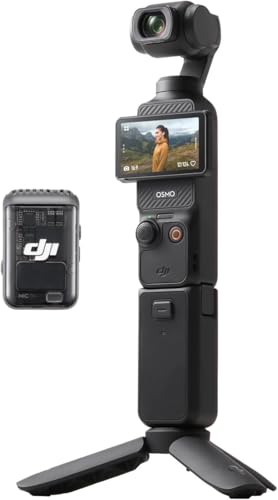
The DJI Osmo Pocket 3 Creator Combo Vlogging Camera is a game-changer for content creators who crave portability without sacrificing quality. With its 1-inch CMOS sensor, you can record stunning 4K video at 120fps. The advanced 3-axis stabilization guarantees your footage remains smooth, while ActiveTrack 6.0 keeps your subjects in focus. The 2-inch rotating touch screen makes composing shots effortless. Plus, the Creator Combo includes essential accessories like the DJI Mic 2 for superior audio. With a compact design and quick charging, this camera’s built-in battery supports up to 22 minutes of continuous recording—perfect for your next adventure.
Best For: The DJI Osmo Pocket 3 Creator Combo is best for vloggers and content creators seeking a portable, high-quality camera for action-packed scenes and immersive storytelling.
Pros:
- Exceptional 4K video recording at 120fps with a 1-inch CMOS sensor for stunning imagery.
- Advanced 3-axis stabilization and ActiveTrack 6.0 for smooth footage and reliable subject tracking.
- Compact design with a rotating touch screen for easy shot composition and framing.
Cons:
- Limited continuous recording time of approximately 22 minutes, which may require additional planning for longer shoots.
- The need for a separate purchase of the DJI 65W PD charger for optimal charging efficiency.
- Requires a microSD card for footage storage, which is not included with the camera.
Docking Station External Hard Drive Storage (1TB)

Combining a 1TB external hard drive with a versatile docking station, this device is perfect for photographers and videographers who need efficient storage and connectivity. Its all-in-one design includes USB-C, USB 3.0, and card slots for SD and TF, allowing you to connect multiple devices effortlessly. With 1TB of storage, you can securely back up large files and multimedia content without worry. Plus, its broad compatibility with Windows, Mac, and Linux guarantees seamless integration. The compact design enhances portability, making it easy to transport, while reducing the need for multiple adapters, streamlining your workflow considerably.
Best For: This product is best for photographers and videographers who require efficient storage and connectivity for their devices.
Pros:
- Versatile connectivity: Includes multiple ports such as USB-C, USB 3.0, and card slots for easy device connection.
- Ample storage: 1TB capacity provides plenty of space for large files and multimedia content.
- Broad compatibility: Works seamlessly with Windows, MacOS, Linux, and other operating systems.
Cons:
- Limited to 1TB: Users needing more storage may find the capacity insufficient.
- Portability may vary: While compact, the overall weight and bulkiness may not suit all users.
- Potential speed limitations: Data transfer speeds may be slower with older USB 2.0 connections compared to newer standards.
Kingston USB3.2 Gen2 Workflow Station Dock with 5G USB-A/C Hub

Designed for photographers and videographers, the Kingston USB3.2 Gen2 Workflow Station Dock with 5G USB-A/C Hub streamlines your multimedia transfer process. With the ability to transfer video, photos, and audio from multiple sources simultaneously, you can work efficiently. It supports up to four Workflow Readers at once, maximizing your productivity. Exclusively compatible with Kingston Workflow Products, this dock offers flexibility and adaptability for your evolving technology needs. The included USB miniHub guarantees versatile connectivity options, making it an essential tool for your workflow. Elevate your photography process and keep everything organized with this powerful dock.
Best For: Photographers and videographers seeking a streamlined multimedia transfer solution.
Pros:
- Supports simultaneous transfer of video, photos, and audio from multiple sources.
- Can accommodate up to four Workflow Readers at once for enhanced productivity.
- Flexible and future-proof design adapts to evolving technology needs.
Cons:
- Exclusively compatible with Kingston Workflow Products, limiting options for users with other brands.
- SD/microSD readers are sold separately, increasing the overall cost.
- May require additional setup time to integrate fully into existing workflows.
BENFEI 7-in-1 USB C HUB Multiport Adapter

For photographers and videographers on the go, the BENFEI 7-in-1 USB C HUB Multiport Adapter is a game changer. This multiport adapter expands a single USB-C port into an HDMI port, three USB 3.0 ports, and both micro and SD card slots. You’ll enjoy lightning-fast data transfer speeds up to 5Gbps and stunning 4K video output. Its sturdy aluminum casing guarantees durability and performance stability, fitting snugly with various devices like the iPhone 15 Pro and MacBook. Plus, with an 18-month warranty and excellent customer support, you can rely on this hub to keep your workflow seamless.
Best For: Photographers and videographers who need a reliable and versatile multiport adapter for seamless connectivity on the go.
Pros:
- Fast Data Transfer: Supports speeds up to 5Gbps for quick file transfers.
- Versatile Connectivity: Expands a single USB-C port into multiple ports, including HDMI and USB 3.0.
- Durable Design: Premium aluminum alloy casing ensures longevity and stability.
Cons:
- Limited Compatibility: May not work with all USB-C devices unless they support video output.
- Power Delivery Limitations: 100W Power Delivery may not be fully utilized with all connected devices.
- Sync Speed Variations: Syncing may be slower on certain devices like USB 3.1 Gen 1 and Samsung Galaxy S8/S9.
Factors to Consider When Choosing a Camera Workflow Hub
When choosing a camera workflow hub, you need to think about several key factors. Consider the connectivity options available, as well as the data transfer speed and compatibility with your devices. Don’t forget to evaluate the portability and design, along with any power delivery features that may enhance your workflow.
Connectivity Options Available
Choosing the right camera workflow hub requires careful consideration of the connectivity options available. Look for a hub with various ports, like USB-C, USB 3.0, HDMI, and card slots for SD and microSD. This enhances compatibility with your devices. Multiple interface options are essential, allowing you to connect several peripherals at once, which streamlines your workflow and cuts down on the need for extra adapters. Additionally, consider hubs that support power delivery, so you can charge your devices while connected. Finally, verify the hub is backward compatible with older USB standards. This will help you integrate the hub seamlessly into your existing setup without needing to replace all your equipment.
Data Transfer Speed
Data transfer speed plays a pivotal role in how efficiently you can move large video files and other media. When you’re working with high-resolution content, faster speeds are essential for quick access to your files. Look for a hub that supports USB 3.2 Gen 2, which offers speeds up to 10Gbps, greatly reducing those frustrating wait times. It’s also important to take into account backward compatibility; a hub that supports older devices guarantees you won’t encounter bottlenecks in your workflow. Additionally, integrating high-speed ports like USB 3.1/3.0 alongside USB 3.2 expands your connectivity options while maintaining fast transfer rates. Prioritizing data transfer speed will streamline your photography process and enhance your overall efficiency.
Compatibility With Devices
A camera workflow hub’s compatibility with your devices can greatly impact your overall efficiency. Start by ensuring the hub supports the operating systems you use, like Windows, macOS, or Linux, for seamless integration. Check its compatibility with your specific camera brands and models to guarantee effective data transfer. Look for hubs that offer various interface options, such as USB-C, USB 3.0, and HDMI, to accommodate multiple devices and peripherals in your workflow. Don’t overlook data transfer speeds, especially for high-resolution video and image files, like 4K content. Finally, consider the hub’s power delivery capabilities so it can charge your devices while you work, maximizing efficiency during your shoots or editing sessions.
Portability and Design
While you’re out capturing stunning visuals, having a portable and well-designed camera workflow hub can make all the difference. Look for a compact and lightweight design that’s easy to transport to various shooting locations. A versatile all-in-one hub minimizes the number of devices you need, enhancing your mobility. Make sure the hub supports multiple interfaces, allowing you to connect various camera accessories without the hassle of extra adapters. Durability is key—choose a hub built to withstand dynamic environments for long-lasting use. Additionally, opt for a design that allows for heat dissipation, ensuring consistent performance during extended shoots, especially for video recording. With the right hub, you can focus on your creativity without worrying about your gear.
Power Delivery Features
When choosing a camera workflow hub, considering Power Delivery (PD) features can greatly enhance your shooting experience. PD allows you to charge devices while transferring data, ensuring your equipment stays powered. Many hubs support high wattage up to 100W, making it easy to charge laptops and other power-hungry devices quickly. With smart power management, these hubs optimize charging speed based on your device’s needs, preventing overheating and ensuring safety during use. By reducing the number of required power adapters and cables, PD-enabled hubs help create a more organized setup for photographers and videographers. Plus, their compatibility with various devices means you can maintain functionality without interruptions during data transfers, streamlining your workflow effectively.